# Welcome

[**GhostMarket**](https://ghostmarket.io/) is a fully non-custodial NFT marketplace, powered by smart contracts on each integrated blockchain. GhostMarket features an intuitive [**self-minting platform**](https://ghostmarket.io/mint/)**,** providing fast and efficient minting and listing of artwork&#x73;**.**&#x20;

The self-minting platform allows artists and developers to create NFTs and control the royalty percentage, attributes, locked content, and more.

NFT collectors and casual buyers can filter and sort the available listings from multiple blockchains to find, then purchase their next masterpiece.


# Quick Navigation

* [**Artists & Creators**](/user-guides/creating-and-managing-nfts) - Learn how to create NFTs on GhostMarket.
* [**Traders & Collectors**](/user-guides/buying-and-selling-nfts) - Learn how to buy and sell NFTs on GhostMarket.
* [**Developers Minting NFTs**](/developer-guides/minting-tokens) - Learn how to programmatically interact with our smart contracts.
* [**Developers Retrieving NFTs**](/developer-guides/accessing-nft-data) - Learn how to retrieve data using our API.
* [**Developers Reference**](/developer-guides) - Detailed references on NFT contracts, API, SDK, and data structures.
* [**GFUND**](/user-guides/ghostmarket-incentives/gfund) - Learn about our next generation single token index fund.


# User Guides

The following User Guides contain everything you need to get started on GhostMarket.


# Getting Started

Learn the basics of GhostMarket

The following guides will teach you how to use the basic features of GhostMarket.\
\
If you're a brand new user, we recommend starting from the beginning and going through each guide step by step. Experienced users looking for a specific guide can simply choose one from the list.\
\
If there is something you think we should add to our guides section, please visit us on Nolt, Discord, or Telegram and let us know your thoughts.


# NFTs Explained

What exactly is an NFT?

  NFTs (Non-Fungible-Tokens) are digital items used to validate ownership. Although NFTs are recorded on a blockchain in similar ways to other cryptocurrencies like Bitcoin, every NFT is unique from one another. This gives creators the opportunity to showcase their art, music, and other media as a limited collectible in similar ways to physical items such as trading cards or comic books.

<figure><img src="/files/Cxw0v63jVAfZNf4P0M7s" alt=""><figcaption><p>Various NFTs that have been created on GhostMarket by Star Girl</p></figcaption></figure>

 A side from selling NFTs to collectors as a way to earn income as an artist and showcase your work digitally, there are many additional benefits when creating NFTs. Royalties can be added to an NFT to earn passive income each time it’s traded, additional digital assets can be infused inside of an NFT to reward collectors, physical items or memberships can be tied to owning the NFT, and so much more.

<figure><img src="/files/4wFHNS45HNSuug2EVraU" alt=""><figcaption><p>An example of a music NFT that includes a free download of the artist's song</p></figcaption></figure>

GhostMarket’s self-minting platform, suite of advanced trading features, and integration of multiple blockchains make it the best platform to create, buy, sell, trade, and collect NFTs. It’s incredibly easy to get started and the possibilities are endless!


# Supported Blockchains

What blockchains does GhostMarket support?

Whether you’re planning on trading or creating NFTs, the first step is choosing a blockchain.\
\
GhostMarket is a multi-chain NFT marketplace, meaning it supports multiple blockchains. There are benefits to using different chains to create NFTs, most of which you can read about on a blockchain’s website. One of the biggest benefits of having multiple chains to choose from is the diverse range of collectors that prefer to use one blockchain over the other for trading NFTs.&#x20;

Each blockchain has its own standard, which is essentially a unique system created inside each chain that allows the NFT to be used.\
\
GhostMarket currently supports seven blockchains, each with it’s own standard:  \
\
**Avalanche** - BEP-721 and BEP-1155\
**Base** - ERC-721 and ERC-1155\
**BSC** - BEP-721 and BEP-1155 \
**Ethereum** - ERC-721 and ERC-1155\
**Neo** - NEP-11\
**Phantasma** - PEPE-12\
**Polygon** - ERC-721 and ERC-1155

<div data-full-width="true"><figure><img src="/files/RMcihyuHf0pfwLMeCHTH" alt=""><figcaption><p>Integrated blockchains on GhostMarket can be filtered when browsing NFTs</p></figcaption></figure></div>

Once you’ve decided on a blockchain, you can use GhostMarket’s self-minting platform to start the process of creating your NFT. Keep in mind that you will need a wallet connected to your profile and the necessary funds to pay for any fees associated with minting your NFT.\
\
GhostMarket is currently working on the integration of our eighth blockchain, with more to follow. \
\
\**Creating NFTs on Ethereum is currently not available to users, but will be accessible in the near future.*  


# Supported Wallets

What wallets does GhostMarket support?

In order to interact with NFTs on GhostMarket and set up your user profile, you wallet that is compatible with the blockchain you’re looking to trade on. Since GhostMarket is a multi-chain marketplace, there is a large variety of wallets to choose from.  \
\
While most EVM blockchains support the same wallets, chains like Neo and Phantasma often have their own dedicated wallets. Keep in mind that in order to utilize all of GhostMarket’s integrated chains, you will need multiple wallets.  \
\
The following wallets are supported on GhostMarket for each blockchain:

#### BSC

<figure><img src="/files/1tpVl1gg6HVjIqSRuhRv" alt=""><figcaption></figcaption></figure>

 Metamask Wallet , WalletConnect, Coinbase Wallet, Trust Wallet , BitKeep, ONTO, TokenPocket, SafePal Wallet , 1inch Wallet, OKX Wallet 

***

#### Neo N3

<figure><img src="/files/qdSrgWk71uDBjMJmsQFw" alt=""><figcaption></figcaption></figure>

  Neoline Wallet,  O3 Wallet , OneGate, Neon Wallet  

***

#### Phantasma

<figure><img src="/files/l8q3QlS3NLqsmqR55zHy" alt=""><figcaption></figcaption></figure>

Ecto Wallet , Poltergeist Wallet  

***

#### Polygon

<figure><img src="/files/AAzqu7pZ5yuChbxshaWW" alt=""><figcaption></figcaption></figure>

  Metamask Wallet, WalletConnect , Coinbase Wallet, Trust Wallet , BitKeep , ONTO, TokenPocket, SafePal Wallet , 1inch Wallet, OKX Wallet  

***

#### Avalanche

<figure><img src="/files/WlhmXYk51FTwrI9rgcYA" alt=""><figcaption></figcaption></figure>

Metamask Wallet , WalletConnect,  Coinbase Wallet, Trust Wallet , ONTO,  Core, TokenPocket , SafePal Wallet , 1inch Wallet, OKX Wallet

***

#### Ethereum

<figure><img src="/files/L2vJqjCcEOd3vi5V4I4o" alt=""><figcaption></figcaption></figure>

  Metamask Wallet,  WalletConnect,  Coinbase Wallet, Trust Wallet, Exodus, BitKeep,  ONTO, TokenPocket,  SafePal Wallet,  1inch Wallet, OKX Wallet  

***

#### Base

<figure><img src="/files/fEENgYarPxgNL6Hf1DIt" alt=""><figcaption></figcaption></figure>

  Metamask Wallet Coinbase Wallet

***

\
  As GhostMarket continues to integrate blockchains, we will also continue to add new wallets.\
\
Remember to be mindful when downloading or installing a wallet to your device. Always make sure you’re on the correct website and do your own research before using a new wallet.


# Connecting Wallets

How do I connect my wallet to GhostMarket?

Connecting a wallet to GhostMarket enables you mint, buy, sell, and trade NFTs through your user profile. You can connect any supported wallet across any of the seven integrated blockchains on GhostMarket. Note that some wallets work across multiple blockchains, while others require a specific wallet that only works on that chain.  \
\
To connect your wallet to GhostMarket, start by clicking on the profile icon in the top right corner of the page.

<figure><img src="/files/6THD0akVI6Si8IjUNU5Y" alt=""><figcaption></figcaption></figure>

  You will then see a dropdown menu with the prompt to add your wallet.\ <br>

<figure><img src="/files/6VoIoIS2AfeVQbsnM2Zc" alt=""><figcaption></figcaption></figure>

Select the blockchain you wish to use, then choose a wallet from the available options. For this example, we’re choosing BSC as the blockchain and MetaMask as the wallet.  If you don't have the desired wallet yet, there is an option to download the wallet as well.&#x20;

<div align="left"><figure><img src="/files/udU96IvZAdjru6ajtLJM" alt=""><figcaption></figcaption></figure></div>

A popup window from the wallet will appear and you will need to login with your credentials. Each wallet has its own login screen and process. Once you login, the wallet will automatically connect to GhostMarket and you will see new options in the dropdown menu for navigating the platform.  

<figure><img src="/files/GC8RoU3WJlJM8BT8rpJh" alt=""><figcaption></figcaption></figure>

Towards the bottom of the drop-down menu, you will see all of your connected wallets, which includes your cryptocurrency balance and other info pertaining to that specific wallet. To disconnect your wallet at any time, simply click the power icon. If you want to reconnect your wallet again at a later point in time, you will need to repeat the process.  

<figure><img src="/files/Gbb6Wc26XnuYPvas4fgl" alt=""><figcaption></figcaption></figure>


# Editing User Profiles

How do I set up or edit my GhostMarket user profile?

Your GhostMarket user profile is the hub for all of your NFTs, as well as any info you wish to include about yourself.   This includes your name, bio, social media links, website, wallets, profile picture, and banner. Having a properly set up profile makes it easier for other users to discover your NFTs on GhostMarket, and also helps to legitimize your profile so that it can be verified.

<figure><img src="/files/OONsYC0AQoaS3cSVJD7T" alt=""><figcaption></figcaption></figure>

To edit your user profile, click on the pencil icon in the far right corner of the page. This sits alongside the blockchain icon and the share icon. Your social media icons will not appear here until they’ve been added manually.

<figure><img src="/files/xhNrzIeFpnspDJqWKb9i" alt=""><figcaption></figcaption></figure>

  Starting at the top, you will see “Profile Settings” with various options below it. To edit your info, we’ll start with the “General” settings tab.\ <br>

<figure><img src="/files/iUvTLWDrzVsPQjqw1PPL" alt=""><figcaption></figcaption></figure>

Picking a username is the first step and will allow you to be discovered easily on GhostMarket. Your username is essentially your profile URL. This can be between 3 and 32 characters, but can not include any spaces.  \ <br>

<figure><img src="/files/HHdicAZnbJnEQ39eb7M7" alt=""><figcaption></figcaption></figure>

Your “Title” is the name that appears on your actual profile. This can be between 3 and 30 characters, with spaces allowed as needed.

<figure><img src="/files/HwM3bp0bQunZlIkeiPq3" alt=""><figcaption></figcaption></figure>

Below the Username and Title sections, you will find the area to upload your “Avatar” and your “Banner”. The images you choose must be smaller than 50 MB, and can be any of the following file types: JPEG, JPG, PNG, MP4, SVG, GIF, and WEBP.  

<figure><img src="/files/mIEkUG4rtQqbuN8Mo1Db" alt=""><figcaption></figcaption></figure>

  After you’ve uploaded your avatar and banner, you’ll have the option to enter in your email, website, and social links. Adding your email will allow you to receive email notifications regarding NFT sales and offers, while adding your website and social media links will help users find you outside of GhostMarket.  \
\
The current supported social media links you can provide are Twitter, Facebook, Instagram, YouTube, Telegram, and Spotify.

<figure><img src="/files/kY3dKFk5PkIDlOtbDAkj" alt=""><figcaption></figcaption></figure>

  Last but not least, you can choose to include a bio that describes who you are as a person. This can include any type of info you like, so get creative! Once you're finished, click "Update Profile" at the bottom of the page to save and apply all of your recent changes.

<figure><img src="/files/aRpFgpraVt9aIxI5b80D" alt=""><figcaption></figcaption></figure>

Moving on to the “Wallets” settings tab, you will be able to see all wallets that are associated with your GhostMarket profile. In this example, you can see that the GM Legacy Collection profile has a wallet for each blockchain that is associated with our account, but currently the BSC wallet address is the only one actively connected. If you're ever interested in deleting your profile to start fresh with new wallets, there is an option below all of the wallets listed.\ <br>

<figure><img src="/files/rAcTSx8QNTJGbSWBPHvM" alt=""><figcaption></figcaption></figure>

The final settings tab is for anything related to “Notifications”. This is where you will have the option to change which settings you receive via email if you’ve connected your email address. You can also set an alert threshold, which will only notify you about offers above a set price point.

&#x20; \ <br>

<figure><img src="/files/uEoDiwnSPWL15OlRona5" alt=""><figcaption></figcaption></figure>


# Editing Collection Profiles

How do I set up or edit my NFT collection's profile on GhostMarket?

If you own an NFT collection that is available on GhostMarket, collection profile is the hub for all of NFTs within the collection, as well as any info you wish to include about the collection.

<figure><img src="/files/tICdZdUhh1KVTideJnrT" alt=""><figcaption></figcaption></figure>

This includes the collection’s name, bio, social media links, website, contracts, profile picture, and banner. Having a properly set up profile makes it easier for other users to discover your NFT collection on GhostMarket, and also helps to legitimize your collection so that it can be verified.

To edit your collection profile, you’ll need to ensure that you have the wallet associated with creating the collection. When connecting the wallet to GhostMarket, it will automatically show the collection if it’s available on the platform.

Once your wallet is connected, click on the pencil icon in the far right corner of the collection page. This sits alongside the blockchain icon and the share icon. Your social media icons will not appear here until they’ve been added manually.

<figure><img src="/files/3bRFTqUjec3TBNAR7oz3" alt=""><figcaption></figcaption></figure>

The first option you’ll see is for changing the “Collection Slug”. Picking a collection slug is the first step in properly setting up the collection’s profile and will allow it to be discovered easily on GhostMarket. For reference, your collection slug is essentially your profile URL. This can be between 3 and 32 characters, but cannot include any spaces.

<figure><img src="/files/znhv2keYvCIZa1tpcDbt" alt=""><figcaption></figcaption></figure>

Your “Collection Title” is the name that appears on the actual profile. This can be between 3 and 30 characters, with spaces allowed as needed.

<figure><img src="/files/w5ApVTdmPmdXJjsRkrm8" alt=""><figcaption></figcaption></figure>

Below the Username and Title sections, you will find the area to upload an “Avatar” and “Banner” for the collection. The images you choose must be smaller than 50 MB, and can be any of the following file types: JPEG, JPG, PNG, MP4, SVG, GIF, and WEBP.

<figure><img src="/files/x01pdWB19FJad33ioVVX" alt=""><figcaption></figcaption></figure>

After you’ve uploaded your avatar and banner, you’ll have the option to enter in your website and social links. Adding your website and social media links will help users find you outside of GhostMarket.  The following links can be added to your collection page: Twitter, Website, Instagram, Facebook. Telegram, YouTube, Medium, and Discord.

<figure><img src="/files/Xgy5UST9K6ie979u9TQf" alt=""><figcaption></figcaption></figure>

One of the most important settings is the option to add a royalty percentage to your collection. This will give you a percentage of the selling price after an NFT has been sold on the secondary market. There is also an option to write in the wallet address of a different recipient for the royalties.

<figure><img src="/files/nrrXT3Zc7VVoekIS2ahU" alt=""><figcaption></figcaption></figure>

To better categorize your collection with similar collections on GhostMarket, you can choose a category that the collection fits into. Categories include Art, Games, Utility, Defi, Music, Other, Photography, Metaverse, and Classic.

<figure><img src="/files/SXmMcQBTxFstsGQtacma" alt=""><figcaption></figcaption></figure>

Last but not least, you can choose to include a description that tells users more information about the NFT collection.

<figure><img src="/files/jCkPxfyIAjtenD1dneap" alt=""><figcaption></figcaption></figure>

Please note that GhostMarket will sometimes update NFT collection profiles manually as they are added to GhostMarket to ensure the information isn’t completely blank. We do this to the best of our ability with information that is accessible to us, but some information might need to be adjusted.

Additionally, GhostMarket team members are not able to adjust the royalty amount of any NFT collection. Royalties can only be set by the owner with the wallet that created the collection connected to GhostMarket.


# Viewing Owned NFTs

How do I view my NFTs?

<figure><img src="/files/3ySDcZNYPeicO1wOsTP9" alt=""><figcaption></figcaption></figure>

After your profile is set up, you’ll be able to view the NFTs you’ve already created or collected outside of GhostMarket. Simply head to your profile page and click the “NFTs Available” tab to see your collection. The process is the same to view an NFT you’ve recently created or collected on GhostMarket.  

<figure><img src="/files/obycbT442ro9FyAdf5Ys" alt=""><figcaption></figcaption></figure>

If you are browsing a different area of the site, you can click on the profile icon in the top right corner of the page to one the dropdown menu. Click “My NFTs” to quickly return to your NFT collection.&#x20;

<figure><img src="/files/SpkmTGEluZuxfHv1Qrjc" alt=""><figcaption></figcaption></figure>

<figure><img src="/files/dADXutZH1pndOjMGdNcx" alt=""><figcaption></figcaption></figure>

The NFT tab on your profile also shows NFTs sorted by important categories such as NFTs on sale, Bids on NFTs, Offers on NFTs, Offers placed, NFTs created, and your overall activity.

<figure><img src="/files/a9a9hmxeUHxn0Y2w6Uyr" alt=""><figcaption></figcaption></figure>


# Profile Verification

GhostMarket offers three forms of Verification, Artist, Collector and Collection.

GhostMarket strives to provide NFT buyers with confidence in the pieces minted on its site. While we take care to moderate and remove illegal copies or counterfeit NFTs minted or sold on our site, the nature of this sector means that sometimes buyers can buy NFTs that are not authentic.

To provide some security to a buyer we have introduced an Artist Verification process (outlined below), that will give some assurances to those wanting to determine an artist’s authenticity.

Likewise, also available is a Collector Verification, that will provide other users confidence in buying NFTs that are being sold by someone other than the original artist.

We will shortly be adding Collection Verification.

**TL:DR - Artist and Collector**

Here is the direct link to the form to apply (from the 1st of the month until the 15th of the month)

{% embed url="<https://docs.google.com/forms/d/e/1FAIpQLScjRGZRH-_bZ2nmGMJVL0LTnNm4cJMnjN7wp1YK-GCk8f-vuQ/viewform>" %}

**What is Verification?**

GhostMarket Artist and Collector Verification will mean that they have undertaken the steps outlined in the policy which, when authenticated, will provide a ‘blue tick’ next to their GhostMarket User Profile.

**What will being verified on GhostMarket give you?**

By being verified on GhostMarket, you will be shown on the GhostMarket website in (but not limited to) the following ways:

* With a blue tick next to your user profile name

![](https://miro.medium.com/max/700/1*JtH-x4yridBeb4_q_VeFFQ.png)

* You will be displayed (currently in alphabetical order, soon through a more intelligent algorithm) before unverified artists, when someone searches ‘all users’ on our website

<figure><img src="/files/rjnyxyacfRtl33OW9UIx" alt=""><figcaption></figcaption></figure>

Newly minted and current ‘for sale’ NFTs (by whatever method), may be featured on the GhostMarket homepage. This will increase exposure for your work and will provide you with confidence that the NFT quality shown to our website visitors is of a high quality.

**Accounts Eligible for Verification\***

In order to be considered for verification on GhostMarket you must have achieved at least the following to apply:

* Have an active (fully set up) GhostMarket User Profile, which has been in existence for at least one (1) month

For more information on setting up a user profile please see our Medium article explaining how to do it

<https://medium.com/ghostmarket/introducing-user-profiles-e031a7739e69>

* Have a least one social media account attached to your user profile, that has at least 100 followers and has been in existence for at least one (1) month
* You must not previously have been flagged by the GhostMarket Team, as having minted or sold a counterfeit NFT or breached copyright over selling an NFT you did not have the rights too.

**Accounts automatically verified**

In the following circumstances these types of accounts will automatically be awarded verification (without necessarily having to undertake the above requirements):

1\. Artist profiles or collections created by notable (famous) people or organisations and endorsed officially by them (eg: bands, musicians, politicians, organisations, large brands)

2\. Accounts with substantial sales activity (of over US$10,000) and verification on other well established NFT marketplaces

3\. Accounts that are at high risk of being subject to severe fraud and/or copying infringement, if not verified.

**Accounts ineligible for verification**

In the following circumstances accounts will be automatically ineligible for verification if;

1\. They have previously been flagged and/or banned from GhostMarket (including under a different name) for minting or selling copyrighted material or breached a trademark without the appropriate license

2\. Accounts that have engaged in, or have willingly tried to deceive fellow users, whether it be by minting, selling, bidding or in an effort to artificially raise the price of their NFTs

3\. If you have violated our ‘Terms of Service’ Policy prior to applying for verification, you will not be eligible.

**Loss of Verification**

If you are a verified artist, you will immediately lose your verification status if it is determined you have participated in any way to the above ‘ineligible for verification’ circumstances.

GhostMarket reserves the right to rescind verification status at any time, for any reason and without notice. Additionally, should you violate our ‘Terms of Service’ once verified, you may also lose your verification status.

**Verification Process**

Applications for verification can only be made via the official GhostMarket form. Users will not be granted verification if they DM any of the GhostMarket Team as a backdoor method to verification.

***Opening & Closing Date Each Month***

Applications will be open from the 1st of the month until 5pm UTC on the 15th of the month.

The GhostMarket Team will aim to assess all applications by the beginning of the next month and announce all new verified artists via Twitter and ‘GM Weekly’ updates.

If you are not granted verification when you apply, you will be ineligible to apply again for a further three (3) months

Applications can only be made via the following [form](https://docs.google.com/forms/d/e/1FAIpQLScjRGZRH-_bZ2nmGMJVL0LTnNm4cJMnjN7wp1YK-GCk8f-vuQ/viewform)

![](https://miro.medium.com/max/676/1*EvdMvNHM-Qe6p_8refROBg.png)

Meeting all of the verification requirements does not automatically guarantee you will be verified as the GhostMarket Team will have the ultimate jurisdiction on who becomes verified on the platform and when.

Full details of verification qualification can be found in our Medium document located here:\
[<br>](https://medium.com/ghostmarket/ghostmarket-verification-process-304bf6a2bedc)<https://medium.com/ghostmarket/ghostmarket-verification-process-304bf6a2bedc>


# Collection Verification

GhostMarket strives to try and provide NFT buyers with confidence in the collections sold on our site. While we take care to moderate and remove illegal copies or counterfeit NFTs minted or sold, the nature of this sector means that sometimes buyers can buy NFTs that are not authentic.

To provide some security to buyers we have introduced a Collection Verification process (outlined below), that will give some assurances to those wanting to determine authenticity of collections sold on GhostMarket.

**TL:DR**\
Use this form to apply for Collection Verification\
\
<https://docs.google.com/forms/d/e/1FAIpQLSf9cwk2EGkYe80J4vN49SG2jebOamcwQWktnshw81F5TIaRPw/viewform>

## **What is Verification?** <a href="#a6bf" id="a6bf"></a>

GhostMarket Collection Verification will mean that the owner of the collection in question has undertaken the steps outlined in the policy which, when authenticated, will provide a ‘blue tick’ next to their collection on GhostMarket.

## **What will being a verified Collection on GhostMarket give you?** <a href="#id-455b" id="id-455b"></a>

By being verified on GhostMarket, you will be shown on the GhostMarket website in (but not limited to) the following ways:

* With a blue tick next to your Collection name

<figure><img src="/files/f7maLYpZ9Brn86I4eGxB" alt=""><figcaption></figcaption></figure>

* You will be displayed based on 7-day volume, before unverified collections, when someone searches ‘All Collections’ on our website

<figure><img src="/files/2ts8mBioF38NY2l7lRRQ" alt=""><figcaption></figcaption></figure>

* Items within the verified Collection will also display the blue tick when individually selected

<figure><img src="/files/QQ2hzL8tMLhcVXih2K4g" alt=""><figcaption></figcaption></figure>

* Newly minted and current ‘for sale’ NFTs within the Collection, may be featured on the GhostMarket homepage.
* Your Collection may be promoted via our social media channels.

## **Accounts Eligible for Verification** <a href="#id-51cd" id="id-51cd"></a>

In order to be considered for Collection Verification on GhostMarket you must have achieved at least the following to apply:

* A Collection must have a minimum of 50 NFTs minted
* Your trading volume must be at least US$5,000
* Have a least one social media account attached to your collection, that has at least 500 followers and is an active community
* Provide a valid email address for your collection (that is linked to your social media accounts)
* Be willing to provide a google drive link to view the original files on the collection to demonstrate your work in the design process (to verify you are the original author of the collection)
* The collection wallet address must not previously have been flagged by the GhostMarket Team, as having minted or sold a counterfeit NFT or breached copyright over selling an NFT it did not have the rights too.

## **Collections automatically verified** <a href="#a570" id="a570"></a>

The following collection types will automatically be awarded verification (without necessarily having to undertake the above requirements):

1\. Artist profiles or collections created by notable (famous) people or organisations and endorsed officially by them (eg: bands, musicians, politicians, organisations, large brands)

2\. Collections with substantial sales activity (of over US$100,000) and verification on other well established NFT marketplaces

3\. Accounts that are at high risk of being subject to severe fraud and/or copying infringement, if not verified.

## **Collections ineligible for verification** <a href="#id-813b" id="id-813b"></a>

In the following circumstances collections will be automatically ineligible for verification if;

1\. They have previously been flagged and/or banned from GhostMarket (including under a different name) for minting or selling copyrighted material or breached a trademark without the appropriate license

2\. Collections that have engaged in, or have willingly tried to deceive fellow users, whether it be by minting, selling, bidding or in an effort to artificially raise the price of their NFTs

3\. Collections that are spin-offs, homage or remex collections

4\. If you have violated our ‘Terms of Service’ Policy prior to applying for verification, you will not be eligible.

## **Loss of Collection Verification** <a href="#cafa" id="cafa"></a>

As a verified collection, you will immediately lose your verification status if it is determined you have participated in any way to the above ‘ineligible for verification’ circumstances.

GhostMarket reserves the right to rescind verification status at any time, for any reason and without notice. Additionally, should you violate our ‘Terms of Service’ once verified, you may also lose your verification status.

## **Collection Verification Process** <a href="#e3cc" id="e3cc"></a>

Applications for verification can only be made via the official GhostMarket form.

Collections will be verified on a rolling basis during the month, via weekly assessment.

If you are not granted verification when you apply, you be ineligible to apply again for a further three (3) months

Applications can only be made via the following form:\
\
[https://docs.google.com/forms/d/e/1FAIpQLSf9cwk2EGkYe80J4vN49SG2jebOamcwQWktnshw81F5TIaRPw/viewfor](https://docs.google.com/forms/d/e/1FAIpQLSf9cwk2EGkYe80J4vN49SG2jebOamcwQWktnshw81F5TIaRPw/viewform)

Meeting all of the collection verification requirements does not automatically guarantee the collection will be verified as the GhostMarket Team will have the ultimate jurisdiction on who becomes verified on the platform and when.

[<br>](https://docs.ghostmarket.io/verification-process)


# Enabling Email Notifications

Feature guide

Email Notifications is the first phase which will concentrate specifically on receiving events.

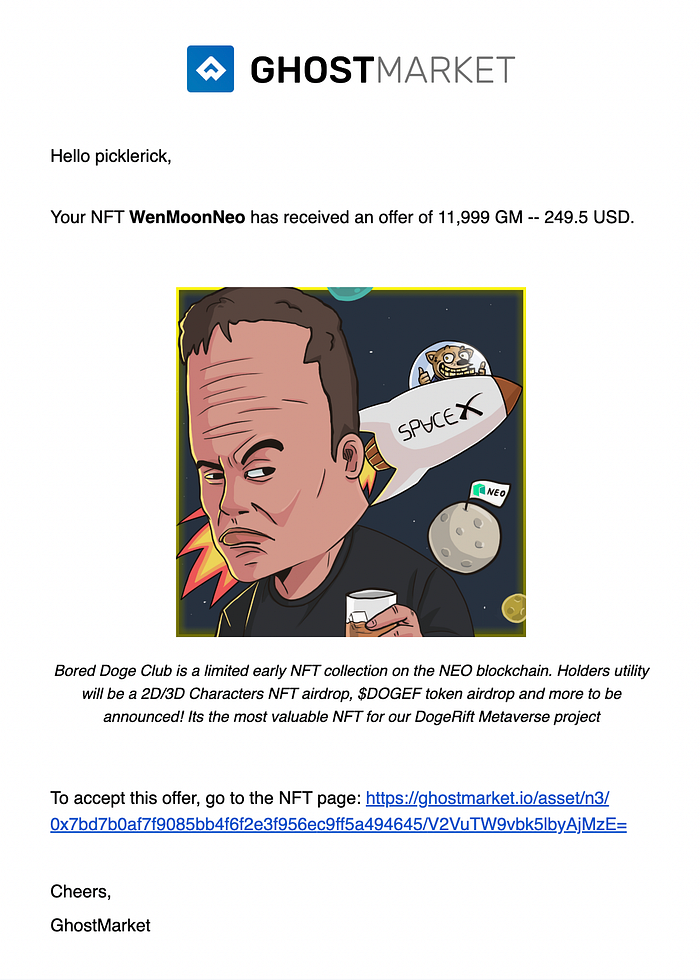
This means that if you have an NFT (whether on sale or not), you will receive an email to tell you when your NFT receives an offer/collection offer, receives a bid or bought/sold an NFT, or if you were outbid on an auction.

<figure><img src="https://miro.medium.com/max/700/1*V7ajVoKXALjnZZ-oK77-Bw@2x.png" alt=""><figcaption></figcaption></figure>

The email will tell you the price and the username (or wallet address) of the one making the offer, bid or purchase.

Overtime additional notifications will be added.

<figure><img src="https://miro.medium.com/max/700/0*WDPZcemcOeMqtwtq.png" alt=""><figcaption></figcaption></figure>

**How do I sign up for Email Notifications?**

In order to sign up for email notifications go to your user profile (account) and click the edit profile button on the far-right side of the screen.

<figure><img src="https://miro.medium.com/max/700/1*mtCksG7gLHC6GLDHgPxVpw@2x.png" alt=""><figcaption></figcaption></figure>

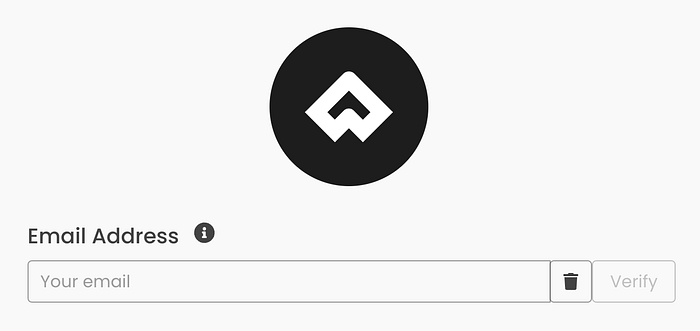
Next, scroll down to the new section for entering your email address. Enter the email address that you would like to use here and click “verify”.

<figure><img src="https://miro.medium.com/max/700/1*3rnNbg_6WrbGAY4rcxCYzg@2x.png" alt=""><figcaption></figcaption></figure>

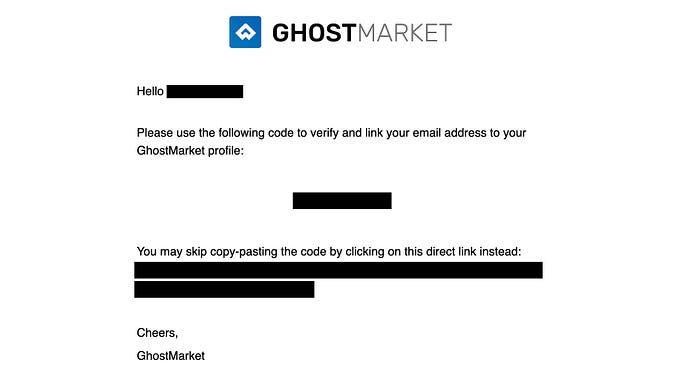
In order to be GDRP compliant, you will be required to confirm your email address, via an email we send you. Once done, you will start to receive email notifications.

<figure><img src="https://miro.medium.com/max/700/1*PQ_u6CEQFbOXWXiQQy91aA.jpeg" alt=""><figcaption></figcaption></figure>

Additionally, GhostMarket now uses JWT tokens in the signature process. This means that each time you perform an action on GhostMarket (like updating your email), users will only need to provide a wallet signature once. The signature will be valid for 24 hours before needing to be signed again, allowing for a more fluid experience across the entire platform.

We hope that our users will welcome the addition of this first phase of email notifications, with more to come by the end of the year.


# Platform Fees

Everything you need to know about the various fees on GhostMarket platform, how they are calculated and who pays and receives them.

For calculation purposes, GhostMarket separates fees into the following categories:

* Royalties
* Trading Fees
* Origin Fees
* Network Fees

#### Overall Logic

Royalties are always honoured first, before any other kind of fees calculation, if present, and deducted from what the seller will get. Then, trading fees (mandatory) and origin fees (optional) are added to the sale price, and paid by the buyer.

### Royalties

Royalties allow content creators to receive an ongoing payment with every sale of their work, for ever.

Royalties are set by the content creator when an NFT is minted and are defined in the NFT smart contract. The royalty is a perpetual fee paid to the content creator every time the NFT is sold and is expressed as a percentage of the sale price (before trading fees are added).

For maximum flexibility, GhostMarket contracts allow for royalties to be specified as an array of objects in the form: `{Address, royalties}`. This allows royalties to be divided and distributed to multiple recipients e.g. If the original NFT was the shared creation of 2 artists, they could each receive a share of the royalties with each sale - say 10% royalty each.\
\
GhostMarket trading contracts enforces a maximum combined of 50% royalties per NFT.\
\
On Phantasma anyone can set royalties and GhostMarket contracts will honour them since it's a chain wide feature, nothing particular is required.\
\
On Neo N3, any NEP11 contract can add a method designed by GhostMarket, that allows our trading contract to read and honour them, we also support contract level royalties. If both are set, contract level royalties take precedence.\
\
On EVM blockchains, we support EIP2981 for NFT level royalties, we also support contract level royalties. If both are set, contract level royalties take precedence.

### Fees

#### Trading Fees

Trading fees are GhostMarket commission on each trade.

#### Origin Fees

Origin fees are an additional fee which is specified by anyone placing a NFT on sale, on a per-order basis and is specified by the fee percentage and the account to receive the fee. A typical application for the origin fee is by a *3rd Party website/dapp* which uses Ghostmarket to process orders. The dapp could use the "origin fee" parameters to allow them to add their own commission trustlessly.

> There are zero Origin Fee (0%) for listings done directly on GhostMarket.io.

### Fee calculations

To sum up fees mathematically, they are calculated on the sale price of each NFT and are distributed as follows:

$$
BuyerPays= BuyPrice + (TradingFee% + OriginFee%)
$$

$$
SellerReceives= (1- RoyaltyFee%) \* BuyPrice
$$

$$
CreatorReceives = BuyPrice\*RoyaltyFee%
$$

$$
TradingPlatformReceives = BuyPrice \* TradingFee%
$$

$$
3rdPartyPlatformReceives = BuyPrice\*Origin Fee%
$$

### Network Fees

Network fees are charged by the blockchain network that the NFT contract is deployed on when traders executed transactions on the network. The amount of these fees is both network and load dependent and is outside of the control of GhostMarket.

### Smart Contracts & Fees

On EVM chains, the fees payable are added to sale price before sending to the buyers connected wallet for authorization and signing. On Neo N3 and Phantasma, the fee is not included in the amount signed for, but is charged within the smart contract.

In both cases, the price paid by the buyer includes all fees and they are detailed at the time of purchase.


# Creating & Managing NFTs

Learn how to create and manage NFTs on GhostMarket

The following guides will teach you how to create and manage NFTs on GhostMarket.\
\
If you're having trouble, refer to the Getting Started Section for details you might have missed. If you have NFTs you're looking to purchase or trade, move on to the Buying & Selling NFTs section.\
\
If there is something you think we should add to our guides section, please visit us on Nolt, Discord, or Telegram and let us know your thoughts.


# Creating NFTs

How do I create an NFT on GhostMarket?

Once you’ve decided on a blockchain, you can use GhostMarket’s self-minting platform to start the process of creating your NFT. Keep in mind that you will need a wallet connected to your profile and the necessary funds to pay for any fees associated with minting your NFT.  On a desktop browser, the creation page can be found by clicking the “Create” button in the navigation bar at the top-right of the page.  

<figure><img src="/files/ZckWaOLtdcqsMLE4n5Gi" alt=""><figcaption></figcaption></figure>

On a mobile device, it can be found by clicking the dropdown menu in the top-right corner.

<figure><img src="/files/Xvpzc1nqXkeHCPUb0RcW" alt=""><figcaption></figcaption></figure>

<figure><img src="/files/oFmSDEoZqlHmHSUGl3ne" alt=""><figcaption></figcaption></figure>

When you arrive at the creation page, you will see a list of available blockchains. Simply click the blockchain you want to use and the UI will adjust accordingly. For this example, we are using BSC.  

<figure><img src="/files/pNG5Tb5GxnqOeMh5YqBS" alt=""><figcaption></figcaption></figure>

 Next, you will need to upload the media that will be displayed as the NFT. GhostMarket supports WEBP, MP4, PNG, JPG, JPEG, GIF, and SVG file types with a size limit of 50 MB. Drag your NFT image into the “Image” section, or click the section to upload it. Only upload files that you have created or have the right to use.

<figure><img src="/files/zpKPUNMcZtMUyB0OeUsC" alt=""><figcaption></figcaption></figure>

  Note that you can preview your NFT, the NFT’s info, the minting summary, and the fees summary to the right of the image upload section. This updates automatically throughout the creation process.

<figure><img src="/files/1hrjf8cS6QAWPvsSJ3uI" alt=""><figcaption></figcaption></figure>

  Depending on the blockchain, you can choose a collection/standard as mentioned previously. This is the smart contract and symbol that your NFT will be minted on.  

<figure><img src="/files/sZNn3e27j8Qo8WsndTX7" alt=""><figcaption></figcaption></figure>

  Name your NFT and write a description to provide potential collectors with more information. If you are uploading artwork not fully created by yourself, you are required to make this clear and add a link to the source artwork. Note that photos may contain geo localization data (in EXIF header). Please remove this information before uploading if you do not want it public.  

<figure><img src="/files/XcXIockSm8EGlFiKmYqI" alt=""><figcaption></figcaption></figure>

<figure><img src="/files/fd7GPI8lWN3CS07KEk5i" alt=""><figcaption></figcaption></figure>

GhostMarket has the option to filter NFTs by type when browsing the marketplace. The various NFT types include generic, art, music, game, NSFW, book, photography, and apparel. Selecting a specific category can make your NFT easier to discover. If you don’t have a specific category for your NFT, you can leave it as generic.

After selecting the NFT type, you can set the royalty amount, quantity, and max supply.  Royalties are defined as a percentage and determines the commission amount you earn each time your NFT sells on the secondary market.  The quantity is the amount of this NFT you will be creating. A single NFT could be considered as rare or exclusive, while minting a larger quantity allows more people to collect them. The current maximum quantity that you can mint at once is 2500 NFTs.  Max supply is the quantity of NFTs that can ever be minted from this initial series. For unlimited supply, set the max supply option to zero.  

<figure><img src="/files/rJR09Ufi1phyDJkcwkGu" alt=""><figcaption></figcaption></figure>

  Attributes are an optional feature that allow you to organize your NFTs by different types and values.

<figure><img src="/files/LXkyRnPdJXlqX7j9DFob" alt=""><figcaption></figcaption></figure>

As you finalize all of the previous details, you will have the option to list your NFT for sale at the time of minting it. Alternatively, you can mint it and then list it for sale at a later time.   If you plan to list your NFT at the time of minting it, you can set the sale amount along with the token type once the option is toggled on. Below the set sale price, you will see the 2% GhostMarket listing fee and the actual amount you will receive after the NFT is sold.

<figure><img src="/files/3i6a8EVhxB11X2igNl21" alt=""><figcaption></figcaption></figure>

  Last but not least, you have the option to add locked content to your NFT. This content can only be accessed by the person who purchases your NFT. Locked content can include various things, such as a link to download an exclusive song or a link to a ticket pre-sale. We encourage our users to experiment with the locked content feature to add incentives for your collectors.  

<figure><img src="/files/HoBtg0LYXW5azIyXrN5G" alt=""><figcaption></figcaption></figure>

The most important step is reviewing all of your information before confirming the mint. Make sure you have uploaded the proper artwork, check for any typos in your description, confirm that you set the correct royalty amount, etc. Once you are satisfied with everything, click “Confirm Mint” at the bottom of the creation page to begin the actual NFT minting process.  

<figure><img src="/files/nb0rGSCdLGyiQz2SMFQT" alt=""><figcaption></figcaption></figure>

  Upon clicking “Confirm Mint”, you will need to approve various transactions with your wallet. These options will be different depending on if you choose to solely mint your NFT, or list it for sale in addition to minting.  After the IPFS (InterPlanetary File System) upload is complete, you will need to confirm the mint transaction with your wallet. Upon clicking “Confirm”, a window with your wallet details will appear. It will provide all of the transaction details, including any gas fees that need to be paid in order to complete the transaction.

<figure><img src="/files/HKwMedmRdABgG4I2nPKS" alt=""><figcaption></figcaption></figure>

Once the mint has been processed, you will get a notification that the transaction was successful and your NFT has been minted. It may take a few minutes for the NFT to appear on your profile.  


# Burning NFTs

How do I get rid of an NFT I don't want?

For those who are unaware, you are not able to delete or destroy an NFT. The only option is to “burn” the NFT, which is a term for sending the unwanted NFT to an address that nobody has access to. This effectively removes it from your wallet and all platforms, and is the next best thing to actually deleting it.  \
\
If you created an NFT with a mistake, want to access an infused asset, or simply don’t want the NFT anymore, you can easily burn it as long as you own it. Keep in mind that once an NFT is sold, you can no longer burn it.

To burn an NFT, go the NFT’s dedicated page and select the “Burn NFT” option listed alongside the other trading options. Confirm, the transaction and follow any prompts given to you by your wallet to complete the process.

<figure><img src="/files/4PpvVa9EwtXA8PNNE940" alt=""><figcaption></figcaption></figure>

<figure><img src="/files/Wim8O9Sdg5nY3MywxNAR" alt=""><figcaption></figcaption></figure>


# Transferring NFTs

How do I send an NFT to someone without charging them?

You don’t have to sell your NFT in order to give it to someone. If you’re looking to send an NFT to someone without them sending you anything in return, you can Transfer the NFT via the NFT’s page.  

<figure><img src="/files/Q23KZPJujWfuy8yAZT9E" alt=""><figcaption></figcaption></figure>

You’ll find the Transfer NFT option listed next to the other trading options. Clicking the “Transfer NFT” button will open up a menu to the right of your screen call the “Transfer Cart”. Just like the buy cart, the transfer cart will show any NFTs you’ve selected to transfer.

<figure><img src="/files/KRDdOMT1mSkKJ8SXWM49" alt=""><figcaption></figcaption></figure>

Below each NFT, you’ll need to add the destination address. This is the wallet you intend to transfer the NFT to.

<figure><img src="/files/BhpDWkiZMX2OJOs05hEE" alt=""><figcaption></figcaption></figure>

  Once you’ve double checked all NFTs and addresses, click the “Confirm Transfer” button at the bottom of the Transfer Cart to initiate the transaction. Please note that you will need to pay for any network and gas fees associated with the NFT transfer.

<figure><img src="/files/dYHLBGmMqsDzUcqboUta" alt=""><figcaption></figcaption></figure>


# Buying & Selling NFTs

Learn how to buy and sell NFTs on GhostMarket.

The following guides will teach you how to buy and sell NFTs on GhostMarket.\
\
If you're looking to learn how to use GhostMarket or create NFTs, please refer to the previous User Guides. If you're looking for advanced trading features, move on to the Platform Features & Tools section. \
\
If there is something you think we should add to our guides section, please visit us on Nolt, Discord, or Telegram and let us know your thoughts.


# Browsing NFTs

How do I browse NFTs on GhostMarket?

There are thousands upon thousands of NFTs available on GhostMarket, with more being added every day. There are multiple ways to browse through them as well. The best way to get started is visiting the “Explore” page.\
\
Click “Explore” in the navigation bar at the top of the page, then select “All NFTs”. Upon arrival, all NFTs will be sorted by the filter” on sale”. You can change the filters to refine your search by using the menus on the left of the page.

<figure><img src="/files/kz4bUD9dcujeE24nYXbe" alt=""><figcaption></figcaption></figure>

<figure><img src="/files/FuK2eQDiAcilXkQp07TA" alt=""><figcaption></figcaption></figure>

There are multitude of filters you can adjust while browsing, including:

**Listing State**\
Choose between All, On Sale, Buy Now, and Auction.

<figure><img src="/files/rhm0oV4K3mp12dpJbQL3" alt=""><figcaption></figcaption></figure>

**Price**\
Select from a wide variety of currency types, then set a low and high amount to search between.  <br>

<figure><img src="/files/XLKJMuetJuGF7Fh5ZmD3" alt=""><figcaption></figcaption></figure>

**Blockchain**\
 Choose one of our seven integrated blockchains.  

<figure><img src="/files/sxOh2ficPnE0tA2U5ZhP" alt=""><figcaption></figcaption></figure>

\
**Currency**\
 Narrow your search with a selection of over 30 currencies, but without the price limits listed above.  

<figure><img src="/files/xoxVabE93yKZZch89jJQ" alt=""><figcaption></figcaption></figure>

**Collections** \
Sort through all collections, which are narrowed down based on the above filters. You can also manually type in a collection’s name or keywords to help you find what you’re looking for.

<figure><img src="/files/wTd1FbgyqQzuP8vFIUEY" alt=""><figcaption></figcaption></figure>


# Buying NFTs

How do I purchase NFTs on GhostMarket?

<figure><img src="/files/sSu6LiAPgzQtKLBxPyDA" alt=""><figcaption></figcaption></figure>

Buying NFTs  GhostMarket has a variety of ways to purchase NFTs, as well as multiple listing types. The most straightforward way to purchase an NFT is to add it directly to your cart.   Start by finding an NFT you like, and go to its dedicated page by clicking on it.

<figure><img src="/files/FECE4mOT8CCxsrGW3sg6" alt=""><figcaption></figcaption></figure>

Below the NFTs name, listing period, and price, you will find the “Add To Cart Button. Alternatively, you can click the connected lightning bolt button to skip the cart and “Buy Now”.

<figure><img src="/files/WWAGpSW7UA3cpSixggzQ" alt=""><figcaption></figcaption></figure>

<figure><img src="/files/YOyOeip6N9dL9fm2b8AI" alt=""><figcaption></figcaption></figure>

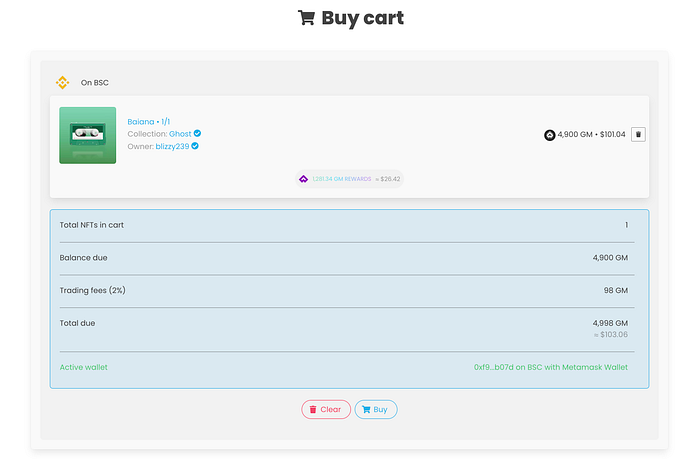
Upon adding the NFT to your cart, you will see that the cart icon has changed. Clicking it will open up the Buy Cart menu, where you can go over all of the details one last time.   Simply click buy, then follow the prompts in your wallet to complete your purchase.

<figure><img src="/files/naQVlqjFiZ478VZVBU4e" alt=""><figcaption></figcaption></figure>

<figure><img src="/files/ZcMBNV1cdcKz0TuRKDcN" alt=""><figcaption></figcaption></figure>


# Selling NFTs

How do I sell my NFTs on GhostMarket?

<figure><img src="/files/pYhl0A7BeVWlN8jcbB7A" alt=""><figcaption></figcaption></figure>

To sell your NFT on GhostMarket, you will need to make sure you have the wallet that contains your NFTs connected to your user profile. Visit your user profile, then click the NFT you want to sell.   Below the NFTs name, listing period, and price, you will find the “Sell NFT” Button. Alternatively, you can select “Auction NFT” for additional listing types.

<figure><img src="/files/5hbANaqJbvxSaLDDxM2U" alt=""><figcaption></figcaption></figure>

Upon adding the NFT to your “Sell Cart”, you will see that the cart icon has changed. Clicking it will open up the sell cart menu.   Adjust the price, currency, and listing period that you would like to set for the NFT.   Click sell, then follow the prompts in your wallet to complete the transaction. Shortly after, your NFT will show that it is on sale and appear on the “explore’ page.

<figure><img src="/files/7Pjv7QQyIyqVwmKXFZ6J" alt=""><figcaption></figcaption></figure>

<figure><img src="/files/PaAKRWOzrJHagkttsw7b" alt=""><figcaption></figcaption></figure>

<figure><img src="/files/Sn3wvnIsK26HSN4flwqc" alt=""><figcaption></figcaption></figure>


# Viewing Site Activity

How can I view activity and statistics on GhostMarket?

  GhostMarket is transparent about all site activity with our users. This is incredibly helpful when making decisions on which NFTs to purchase, checking how your NFT sales are doing compared to other artists, and much more.

  To view the various activity and stats pages, start by clicking “Stats” in the navigation bar located at the top of the page. You’ll see a dropdown menu appear with three options to choose from.

<figure><img src="/files/NHUGGb9GHMo2ColqcczR" alt=""><figcaption></figcaption></figure>

  Activity\
\
  This is the general activity page for everything that is currently happening on GhostMarket. Users can view every transaction that has occurred, in the order it happened.\
\
  Users can also narrow down the activity menu to find specific events by using the menu to the left of the page.  \
\
Alternatively, you can search for an event directly in the search bar, and toggle the order of events by date or price.

<figure><img src="/files/IsUO9YEfwcdzTBYH8FcT" alt=""><figcaption></figcaption></figure>

Rankings\
\
  The rankings page shows a leaderboard for every collection on GhostMarket, across all supported blockchains. The leaderboard shows weekly results across all blockchains by default, but these settings can be changed in the menu to the left of the page. Clicking on any of the collections will also direct you to the collection’s profile.  

<figure><img src="/files/nVU3YQssZNXr2f65Et6E" alt=""><figcaption></figcaption></figure>

Statistics  \
\
The statistics page shows all time stats for all blockchains on GhostMarket combined, as well as individually.

<figure><img src="/files/6lvgYGHZk9na79UuMVQJ" alt=""><figcaption></figcaption></figure>


# Listing Types

GhostMarket supports a full range of strategies for listing NFTs for sale.

### **Fixed Price Listing (Phantasma, Ethereum, BSC, Polygon, Avalanche, Neo N3)**

Fixed Price sales are the simplest type. Your NFT is listed for sale at a **fixed, non-negotiable price.** The fixed price format allows you to sell your items instantly the buyer offers your asking price, the buyers purchase completes immediately — there is no bidding or waiting for the buyer. You can define an unlimited duration or a specific period only.

<figure><img src="/files/li5YXhB8xhyYsdvKieR1" alt=""><figcaption></figcaption></figure>

### **Classic Auction (Phantasma,  Neo N3)**

Classic auctions are traditional auctions where the seller specifies a starting price, a start date, and an end date. The highest bidder on the end-date wins the auction. An optional **extension period** (see below) can be specified. Classic auctions cannot be cancelled once started.

<figure><img src="/files/8i38lvWxBvrtP3MNRyAg" alt=""><figcaption></figcaption></figure>

### **Reserve Auction (Phantasma, Neo N3)**

Reserve auctions only have a starting price. Once someone places a bid equal to at or higher than the starting price, a 24 hour auction starts, after which the highest bidder wins the auction. An optional **extension period** (see below) can be specified. Reserve auctions can be cancelled before the first bid.

<figure><img src="/files/IxZjzgCP41GhFsc96qnC" alt=""><figcaption></figcaption></figure>

### **Dutch Auction (Phantasma, Neo N3)**

Dutch auctions have a starting price, an end price, a start date, and an end date. The price decreases over time during the period from the starting price to the end price. The first bid wins the auction. Dutch auctions can be cancelled before the start date — a maximum of 30 days.

<figure><img src="/files/qIxhTU8OvMNHNnH0f6E4" alt=""><figcaption></figcaption></figure>

## Extension Period

An optional **extension period** can be set for some auction types.  This extends the auction by the **extension period** each time a new bid is received. This feature prevents sniping of high bids in the last second of the auction and provides better price discovery (usually done by bots)


# Platform Features & Tools


# Bulk Buying

How do I purchase multiple NFTs at the same time?

GhostMarket’s bulk buying feature allows multiple NFTs to be purchased at once in the same transaction, as opposed to purchasing each NFT individually. The bulk buying feature is available across all of GhostMarket’s supported blockchains.

Combining this feature with GhostMarket’s “DEX Swap” ability means you can make these bulk NFT purchases with any available token. Please note that the current limit when using the bulk buying feature is 200 NFTs.

<figure><img src="/files/U7Hj7kE1XITIWe7H0mGA" alt=""><figcaption></figcaption></figure>

In the above we have added 3 NFTs for example. Hitting the “Buy” button will bring up the transaction confirmation process, to be able to buy all at once.

The “Allow partial purchase” setting allow you to specify if you want the transaction to go through even if some of the items bought end up being unavailable (ex someone else bought it between the time you added to your cart and the time your transaction got confirmed).

\
To add multiple NFTs to your cart, click the “add” button in the top right corner of the chosen NFT card while browsing. Alternatively, you can click the “add to cart” button on the NFT’s dedicated page.  \
\
Removing NFTs from the buy cart works the same way. Either click the “x” on the NFT you’d like to remove from the buy cart, or click the “remove from cart button” on the NFT’s page.  \
\
To complete your purchase, click the “Buy” button at the bottom of the buy cart and follow the prompts from your wallet.


# Full DEX Swap Support

What DEX does GhostMarket support for swaps?

GhostMarket currently supports the ability to swap your tokens for different tokens available on the chain you’re using. This is a convenient way for users to swap tokens without having to leave GhostMarket.  \
\
This is made possible by integrating multiple DEX for each blockchain we support: \
\
Avalanche - TraderJoe\
BSC - PancakeSwap\
Ethereum - Uniswap\
Neo - Flamingo\
Polygon - QuickSwap  \
\
To utilize this feature, start by clicking the profile icon at the top right of the page.

<figure><img src="/files/gJeErHA3LbeMS3JugRPt" alt=""><figcaption></figcaption></figure>

Select the connected wallet of your choice at the bottom of the drop down menu and click the “Swap” button.  

<figure><img src="/files/g9nX9TsY0uK0PJMDzInD" alt=""><figcaption></figcaption></figure>

This will open up the “Swap Tokens” screen, which has several options you can adjust for the transaction.  

<figure><img src="/files/RLFmQsGXpV719CTZCbv8" alt=""><figcaption></figcaption></figure>

Once you’ve finalized all of your changes, click the “swap” button. You’ll see one final screen to review the details. Click the “confirm” button after double checking everything to begin the swap. After the transaction is completed, your new tokens will now be available in your wallet.

<figure><img src="/files/9karkkNRVezYUpsFA9bt" alt=""><figcaption></figcaption></figure>


# EVM Swap + Buy

How do I swap tokens at the time of purchasing an NFT?

GhostMarket's EVM Swap + Buy feature gives users the ability to swap “on-the-fly” with EVM chains when buying NFTs. This primarily comes into play when you are trying to buy an NFT listed with a different currency than the one you want to pay for. You used to need to make sure the wallet was funded with the right token, which is not the case anymore.

Example: If you are buying an NFT on the Ethereum chain but you only have ETH, and you require to purchase with APE you will be able to swap ETH to APE, all transparently when buying the NFT.

Once you have an NFT in your cart and you click “Buy” you will be given the option. You will also see the current chain network fee next to the “Buy” if your wallet is connected and active.

<figure><img src="/files/bJd0oJCXYQ4YRfzn2M4X" alt=""><figcaption></figcaption></figure>

You will then be given the option to “Buy with ETH” or “Buy with any token”, through all the DEX we have integrated with (Uniswap V3 / PancakeSwap / QuickSwap / Trader Joe).

<figure><img src="/files/4bOHvKLJ7IsTOEJTGU9t" alt=""><figcaption></figcaption></figure>

Choosing “Buy with any token” will open up the swap on-the-fly menu. Which you follow the prompts and GhostMarket will do the rest of it for you.

<figure><img src="/files/6HWSDkmCWVzxxBhowfKp" alt=""><figcaption></figcaption></figure>

**How To Swap Outside Of Transactions**

Press on your profile icon in the top right of the screen to bring out your profile menu then, with your connected wallet choose “Swap”

<figure><img src="/files/OWuZC1LtXriQAKkyIaBb" alt=""><figcaption></figcaption></figure>

You will now be presented with a screen where you can swap your current holdings for the available assets on that chain. You will also at the bottom of the screen which DEX powers the swap and via which route it will go, in the below image it is ETH wrapped to WETH converted to APE.

<figure><img src="/files/JvrmOXC8vHNuu3zTUtC6" alt=""><figcaption></figcaption></figure>

You will then follow the regular prompts to complete the process.


# Favorites

Feature guide

Favorites gives you the ability to favorite an NFT or an NFT collection/Artist, this will help you find collections you have taken interest in previously, as well as allow for expanded searching in the future. Also, next to the favorite button is a view counter, you can now see how many views a collection/artist or an NFT is receiving.

Users will now notice that you can now favorite a collection by pressing on the heart icon.

<figure><img src="https://miro.medium.com/max/700/1*ixt2vwuorG6TwFuIxuut_g.png" alt=""><figcaption></figcaption></figure>

And you can do the same for an individual NFT.

<figure><img src="https://miro.medium.com/max/374/1*HzPXlPmHoRwjoqzMxPg5lg.png" alt=""><figcaption></figcaption></figure>

In the future the search will be expanded to incorporate searching based on favorites/views. As well as track your own list of what you have favorited.

In order to favourite, you will need to be logged in and have a wallet connected. When logging in it is 2 step process. You will connect your wallet and complete the wallet verification acknowledgement, this will keep you logged in for 24 hours. You will know you are logged in via the green dot next to your profile image as seen below.

<figure><img src="https://miro.medium.com/max/646/1*o5gi5lJYIN5pMLfw4hkbpA.png" alt=""><figcaption></figcaption></figure>


# Gas Tracker

What does GhostMarket's Gas Tracker do?

Whenever a user buys, sells, trades, or mints an NFT on GhostMarket, they will need to pay a “gas fee”. Gas fees are required to perform transactions on a blockchain, and the price often dictates how fast your transaction will be completed. This is important to keep in mind, as paying too little gas could result in longer wait times or a transaction failing all together.  

<figure><img src="/files/BWABIZ5etsHTVYKjibBd" alt=""><figcaption></figcaption></figure>

GhostMarket’s gas tracking feature assists users by showing the current gas prices across all of our supported blockchains. Network gas prices are displayed in real-time through the tracker’s UI, which also has additional settings to check the cost of transactions at various speeds.

To open the fee strategy menu within the gas tracker, click on any blockchain. From there, users can choose between slow, standard, fast, and instant transaction speeds which will show various gas prices. Alternatively, leaving the gas tracker set to default will show your current transaction speed prices based on your wallet’s settings.  

<figure><img src="/files/8YOUciWXcKl8KN8ELLKE" alt=""><figcaption></figcaption></figure>

The gas tracking feature is great for taking advantage of low gas prices when they’re available, or being able to wait until high gas prices go down.


# Instant Sell

Feature guide

Instant Sell makes it a very quick process to sell any NFT from your collection of choice to the highest bidder in as few steps as possible.

This feature is only available for chains supporting collections offers. Currently Ethereum, BSC, Polygon, Avalanche and Neo N3

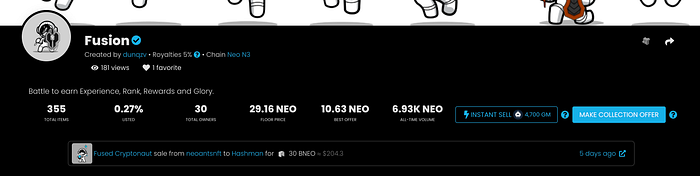
You will find the **Instant Sell** top right on a collection page. This way, if you own an item in the collection you can press this button and follow the process to sell your asset to the highest bidder.

<figure><img src="https://miro.medium.com/max/700/1*W0udIURSYIiVhMZyrfcgcw.png" alt=""><figcaption><p>Collection page with instant sell button</p></figcaption></figure>

This is the equivalent of a “Market Sell” on a traditional centralized exchange. The button, as can be seen below, will be next to the collection offer button.

<figure><img src="https://miro.medium.com/max/700/1*2PSYg97yBTwIW9Iu52-s5Q.png" alt=""><figcaption><p>Instant sell option</p></figcaption></figure>

This button will only show up when there is an open offer available on the collection. You will then be able to select which asset to sell and then complete the transaction by Confirming the action.

<figure><img src="https://miro.medium.com/max/700/0*5QZG5NQ9u-ncQIhR.png" alt=""><figcaption></figcaption></figure>

Once confirmed the sale is complete, if you are the buyer or seller and have chosen to have notifications turned on you will also receive the regular email notification of sale.


# NFT Explorer

The best place to browse, track and discover NFTs. GhostMartket's NFT Explorer provides real-time digital asset tracking to help you to navigate NFT markets with transparency and confidence.

GhostMarket acts as a true NFT explorer for all of the integrated blockchains, allowing you to browse, track and discover all NFT collections currently existing on these blockchains.\
\
We currently handle the curation and addition of collections to the site (a collection is a group of one or more smart contracts tied together) manually, so if you need to have your own collection added, simply reach out to us and we will add it!

{% hint style="info" %}
"Self-Service" collection addition is coming soon!!&#x20;
{% endhint %}

### Blockchain explorers provide verifiable insight into your NFTs.

Every time an NFT is minted or transferred, a transaction occurs on the associated blockchain.\
\
GhostMarket supported blockchains generally provide a public interface to view transactions and verify the provenance and history of each NFT. This public interface is referred to as an explorer.\
\
Each NFT profile has a link to its associated blockchain transaction.

#### For example:

The NFT example below was minted on Neo and its profile includes a link to verify the associated blockchain transactions on Neo's public blockchain explorer called dora.

<figure><img src="/files/dvdclyE5eV9QYQNIdBga" alt=""><figcaption></figcaption></figure>

The NFT profile features a **Details** tab. Clicking the **contract** link will take you to **dora**, where you can see associated transactions with this particular NFT and the contract on which it was created: <https://dora.coz.io/contract/neo3/mainnet/0xcd10d9f697230b04d9ebb8594a1ffe18fa95d9ad>\
&#x20;


# Self-Minting Platform

The NFTs you mint on GhostMarket are tied directly to your wallet. This allows you to create, control, and manage your NFTs directly.

<figure><img src="/files/rUST3tSH0aQYclGJkgYu" alt=""><figcaption></figcaption></figure>

We allow minting on our generic smart contract **GHOST**, on all integrated blockchains, and we support all the NFT standards of the blockchains we're connected to:

* Phantasma supports **PEPE-12.**
* Neo N3 supports **NEP-11.**
* EVM blockchains (Avalanche, Base, BSC, Ethereum, and Polygon) support **ERC-721** and **ERC-1155.**

GhostMarket supports various wallets for each of the blockchains we have integrated:

* Phantasma supports **Poltergeist and Ecto Wallets.**
* Neo N3 supports **O3, Neoline, OneGate, and NEON wallets.**
* EVM blockchains (Avalanche & Polygon & BSC & Ethereum) support **MetaMask, WalletConnect, Trust Wallet, Wallet Link**, and more.

> For step-by-step instuctions for Minting GhostMarket compatible NFTs, see our Minting Guide for [**Users**](/user-guides/creating-and-managing-nfts) or [**Developers**](/developer-guides/minting-tokens).


# Sweep Mode

How do I utilize the Sweep Mode feature?

Sweep Mode is a feature on GhostMarket that allows users to buy multiple NFTs for a specific price, all at once.  

This is a great tool for NFT traders that enjoy buying groups of NFTs from a collection when they’re at their lowest possible price point, also known as “the floor price”. When a trader is able to purchase all available NFTs from a collection that are currently at the floor price, it’s commonly referred to as “sweeping the floor”.  

When using the sweep mode feature, the lowest price NFT from a chosen collection is purchased first, followed by the next lowest priced NFT and so on. GhostMarket also accounts for specific criteria set by the user when utilizing the feature. This is comparable to a traditional exchange when filling a market order purchase.

GhostMarket’s EVM chains (Avalanche, Base, BSC, Ethereum, and Polygon) currently have a limit of 50 NFTs that can be purchased at once when using sweep mode.

  There is currently no limit to how many NFTs you can purchase at once on the Neo and Phantasma blockchains when using sweep mode.  

**How to use the Sweep Mode feature:**

To use the sweep mode feature, start by visiting an NFT collection that you would like to purchase from. For this example, we will use the Neoverse collection on the Neo blockchain.

  To the right of the search bar, click the broom icon sitting next to the additional search options. This will open the “Buy Cart” drop down menu, as well as the sweep mode function.

<figure><img src="/files/sbZ79iqg73tIJWghKNBh" alt=""><figcaption></figcaption></figure>

  The sweep mode function has two options, “Items” and “NEO”.  

The “Items” option allows you to select a specific number of NFTs. The selected amount of NFTs will start at the lowest price and continue to go up in order of price from lowest to highest until the requested amount is met.  

“NEO” gives the option to purchase all available NFTs up to a set amount. The price is based on the chain, so in this case the price is shown in the Neo blockchain’s token.

  When using sweep mode with an EVM collection that exists on multiple chains, the price option will be shown and set in USD.  

<figure><img src="/files/WZ0aM7mTBaNMI4RVmkei" alt=""><figcaption></figcaption></figure>

After setting your criteria, the “Buy Cart” will be updated to show the lowest priced NFTs selected, as well as the total price. When you are ready to complete your purchase, simply click the “Buy” button and follow the prompts in your wallet.  

<figure><img src="/files/enb8YufiiIii63jHYwWd" alt=""><figcaption></figcaption></figure>

As a bonus for EVM chains, there is an “Allow Fail” option. This setting will ignore any individual failed purchases, allowing the remaining NFTs in the transaction to complete. For example, an individual NFT purchase could fail if another trader pays a higher gas fee in order to complete a transaction on the same NFT first.  

<figure><img src="/files/fBpD5kHWKCMqWmm9X9yx" alt=""><figcaption></figcaption></figure>


# GhostMarket Incentives


# GFUND

The next evolution in staking

The next evolution in staking **GFUND!** Something we have been hard at work for quite some time to now bring it to you.

## In Short. <a href="#e6d5" id="e6d5"></a>

* New evolution of single token staking, a NFT Platform-Index-Fund, acting like an index fund, tracking GhostMarket performance.
* Better than traditional LP staking (no impermanent loss, self sustaining)
* Your share of GFUND gives you a cut of all GhostMarket trading fees, exit fees and minting rewards.
* Head [**HERE**](https://ghostmarket.io/incentives/gfund) to get started

## What is GFUND? <a href="#f659" id="f659"></a>

It is a reimagining or an evolution of staking. Normally when you think about staking, it is most of the time about either A) staking two tokens (with the risk of impermanent loss) or B) you would invest token A into a staking pool and earn a percentage bonus in the form of token B.

Those traditional form of staking, while working fine, have some major downside: first they rely most of the time on minting rewards only (meaning once initial period ends, no more rewards), and there’s a risk of impermanent loss (ending up with way less of a token vs the other).

Now, with the new GFUND you are only dealing with 1 token, $GM, our governance token. It is effectively the same as a single token staking, except here you’re buying into a fund instead of staking per se, and there are now multi-avenues to assist in keeping its value inherently up.

**All users of GFUND get to share the following:**

\- **20%\* of our minting rewards** are slowly added over time to GFUND: this amounts to 1 million GM over 3 months.\
\- **20%\* of our trading fees** are added to GFUND on each sale on GhostMarket.\
\- **5%\* exit fees** from people leaving GFUND are added to the fund.

Note: if the trading fee is paid in GM, it is instantly added, if it is in another asset, it will wait until there is 100 GM worth and then convert and add to the fund automatically through a swap on Flamingo.

It is essentially an index fund, the price of GFUND will always be higher than the price of GM token (ratio will start at 1:1), as the pool value increase overtime with trading fees, minting rewards and exit fees. Meaning that you are guaranteed to come out with more GM than you started with (minus the exit fee).

The GFUND yield is not claimable but added to the fund. The fund shares value amongst investors. This means you get your yield in the form of increased GM Tokens when exiting.

\*All numbers subject to change based on how the product performs.

## How can I get in? <a href="#c829" id="c829"></a>

GFUND launched on Wednesday November 09th 2022, at around 7pm UTC

You can buy with any token, whether directly with GM or any other currencies, which will then be swapped for GM tokens “under-the-hood” (GAS fees will apply) through Flamingo.

Anytime anyone enters or leaves GFUND, on top of getting your GFUND tokens, a process starts which does the following:

1. claim unlocked minting rewards and adds them to the pool
2. swap pending trading fees (from GhostMarket) to GM and adds them to the pool

For GAS optimization purpose, 1) and 2) are only performed if the value is more than 100 $GM worth. What this means is that when you enter or leave the pool, it might cost you more or less in network fees depending if those action are performed or not.

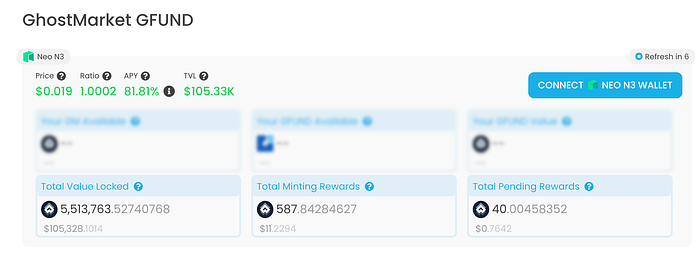
<figure><img src="https://miro.medium.com/max/700/1*SC8hNsJZvge3VoepXsNhGA.png" alt=""><figcaption><p>GFUND Dashboard</p></figcaption></figure>

Purchasing with GM Token

<figure><img src="https://miro.medium.com/max/700/1*rTgVpkYjpak8Di_if9ZsiQ.png" alt=""><figcaption><p>Buying GFUND with GM</p></figcaption></figure>

Paying using a token other than GM token, you can see Flamingo will conduct the swap.

<figure><img src="https://miro.medium.com/max/700/1*KYVCUPLhX7Lc6azMnFqjRg.png" alt=""><figcaption><p>Buying GFUND with any token</p></figcaption></figure>

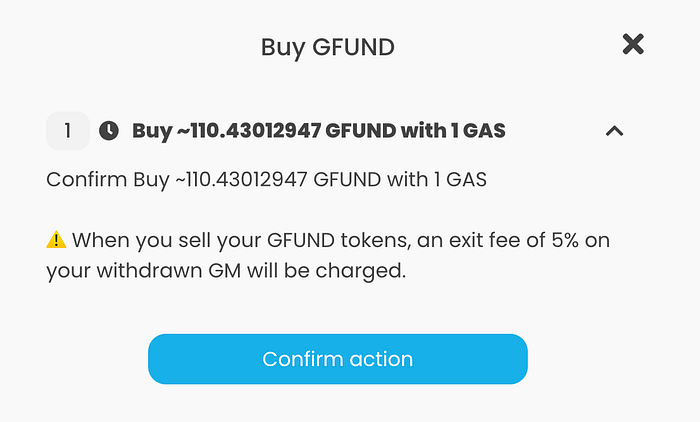
Final confirmation before entering GFUND.

<figure><img src="https://miro.medium.com/max/700/1*P0A29rP9oCgW0f4BodxGuQ.png" alt=""><figcaption><p>Confirm action</p></figcaption></figure>

## How can I get out? <a href="#id-0844" id="id-0844"></a>

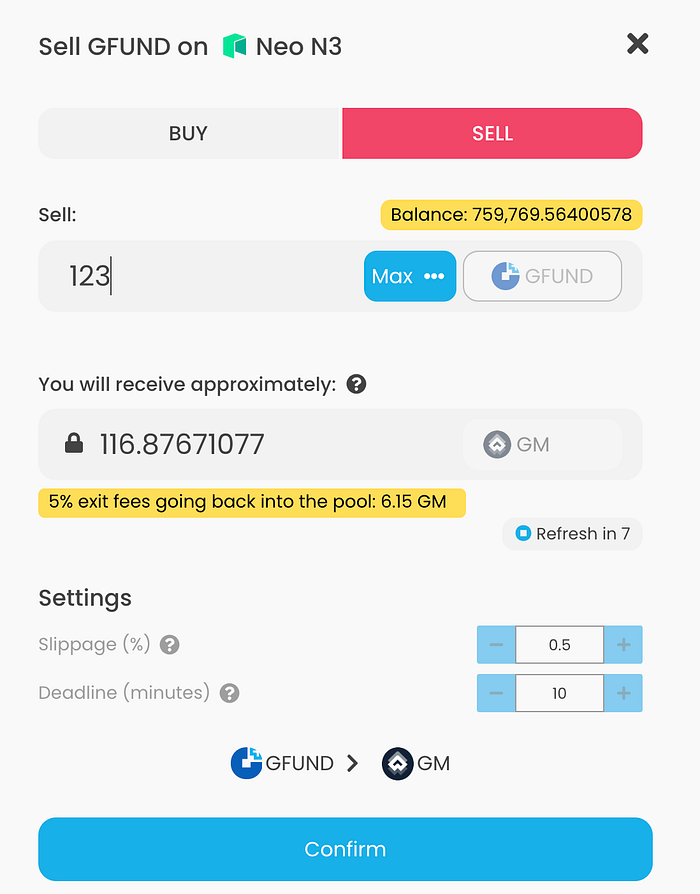
Just as easy as you got in. Have your wallet connected, choose “SELL” and then follow the prompts. Understand that exiting will incur an exit fee, currently set at 5%. The fee was primarily added to encourage longer term staking/lockup and to help negate any potential exploits. We will regularly assess the exit fee and we might change it if required.

<figure><img src="https://miro.medium.com/max/700/1*-2PulZlNYsTryw2cJxbjJQ.png" alt=""><figcaption><p>Selling GFUND</p></figcaption></figure>

NOTE: Past and current performance does not indicate future performance. If unsure, please seek advice from a financial advisor. Do your own research, know the risks involved.&#x20;


# Staking Incentives

Learn more about GhostMarket Staking Incentives

To learn more about staking GhostMarket's $GM token, visit out [Trading Incentives Program](https://ghostmarket.io/incentives/staking) page.

<figure><img src="/files/tLjh69wr37HFzBcjoAGW" alt=""><figcaption></figcaption></figure>


# Trading Incentives

Learn more about the GhostMarket Trading Incentives Program

<figure><img src="/files/nQt15XOa1ysRgtDxJO7v" alt=""><figcaption></figcaption></figure>

The Trading Incentives Program is a way to earn GhostMarket’s token ($GM) every time you but or sell NFTs on GhostMarket. The more you trade on GhostMarket, the more $GM you will receive.

**Who is eligible?**\
All wallets used on GhostMarket that have a minimum trading volume of US $10 (whether selling or buying), are eligible for the incentives distribution.

<figure><img src="/files/3KpOUpZywZPtvh59Ppy0" alt=""><figcaption></figcaption></figure>

**How many tokens are available in total?**\
GhostMarket has up to 50 million tokens available as part of our general, ongoing community incentives distribution program, as outlined during our original token sale. Currently 5.555 $GM tokes are available for distribution per day. The amount of rewards you receive from purchasing or selling an NFT is based on the price the NFT sold for, as well as the total amount of NFT transactions per user, per day on each blockchain.

**Which Chains are eligible?**\
Currently the following chains are eligible for rewards distribution and claiming: Avalanche, BSC, Ethereum, Neo, and Polygon. Base and Phantasma are currently in the process of being added to the program.

All eligible chains are treated equally for the purposes of calculating the rewards for the program

Note: As a bonus trading NFTs with $GM as opposed to other currencies gives users an extra 20% in their daily rewards distribution.

**How are the tokens I will receive calculated?**\
Rewards are calculated daily and distributed or, “topped up”, weekly. Rewards are all based on global volume regardless of which chain you make transactions on. Buyers will share 50% of the tokens distributed, while sellers share the other 50%.

**For Example:**

Let’s say the allocated rewards total is 1,000,000 $GM per week. Regardless of the chain you trade on, having 1% of GhostMarket’s global trading volume for a single week would give you 1% of the allocated reward for that week. In this case, that would be a total of 10,000 $GM in rewards.

We believe this the best way to allocate rewards in a fair way for all users, as it is based on actual volume percentages.

**How does the rewards system work on a technical level?**\
We have a powerful infrastructure committed to this program, with dedicated servers running the calculations and pushing the incentives weekly on each incentives smart contract (one deployed for each blockchain we are integrated with).

Everything is fully automated when it comes to calculation and distribution. Our team monitors all parameters, while making adjustments as needed. These include things like weekly allocation amount, extra bonuses, etc.

**How can I view my rewards?**\
On the Trading Incentives Page, you’ll find a detailed leaderboard. The leaderboard can be filtered by chain to show both weekly and all time rankings for all users across GhostMarket. You’re even able to share your leaderboard placement to social media with a customized graphic.

<figure><img src="/files/2mCeotjSIRMjDYcmy3nu" alt=""><figcaption></figcaption></figure>

In addition to the actual rewards page, each NFT page has a live estimation of the rewards you would receive for buying or selling that specific NFT.

<figure><img src="/files/dygaM5GP0ZofIGxkWePU" alt=""><figcaption></figcaption></figure>

Note: This estimate is based on current values of the incentives program and might differ from what you will actually receive.

**Why should I hold my $GM rewards?**&#x20;

There are a number of benefits to holding the $GM token, including:

* Open Offers and Collection Offers are only paid for with $GM (Neo Only)
* $GM Staking rewards
* Use $GM to advertise your NFT in special sections on GhostMarket
* Bounty programs for community moderation
* NFT drops from select artists, based on token holdings
* Reduced trading fees on GhostMarket (Based on total $GM held) 

**How do I Claim my Tokens?**

<figure><img src="/files/oiEuHYpYdLZqu4plKpU0" alt=""><figcaption></figcaption></figure>

Token calculations are made once per week. These rewards are then locked in the smart contracts (one per chain). Users can then claim what they have earned. If rewards are not claimed each week, they are accrued weekly until claimed (claiming claims 100% of what a wallet is due).

In order to claim your tokens click on the following link: <https://ghostmarket.io/incentives/>

Connect your wallet to find out how many tokens you have to claim.

Click claim, then those tokens will be transferred to your wallet. Tokens will accumulate until you claim them.

**How will you address wash trading?**

Wash trading has been a concern on other platforms and we take it seriously. As part of our weekly calculations, we will be assessing the highest performing wallets to ensure that they are not consistently trading between themselves. When we find misappropriations like this, we will exclude those wallets from the calculations. The GhostMarket Team reserves the right to make the final decision in whether a wallet is eligible to receive tokens earned.


# Developer Guides

Step-by-step guides for developers willing to create and retrieve GhostMarket compatible NFTs.


# Accessing NFT Data

Guide to retrieving NFT content and metadata.

1. Retrieve the NFT & metadata from the blockchain
2. Retrieve the Image/media from IPFS

### 1. Retrieve the NFT & metadata

GhostMarket REST API provides the simplest method of retrieving the NFT Metadata in simple to digest JSON format. We monitor all supported chains and index NFT events, simplifying and standardizing the retrieval of Metadata from the disparate blockchains which we support.

> see our [API reference](/developer-guides/api) for all supported APIs

Use the  API endpoint:&#x20;

Use the [`metadata`](/developer-guides/api) API endpoint, populating the ***{chain}***, ***{contract}*** and ***{token\_id}*** params.

`https://api.ghostmarket.io/api/v2/metadata?chain={chain}&contract={contract}&tokenId={tokenId}`

* See the [Blockchain Short Name](#blockchain-short-names) table for the list of supported ***chain*** names.
* See the [NFT Contract](/smart-contracts/nft-smart-contracts) table for current NFT ***contract***&#x73;.
* The ***token\_id*** is an integer specifying the NFT within the collection (NFT contract)

Example:

```bash
curl -X 'GET' \
'https://api.ghostmarket.io/api/v2/metadata?chain=bsc&contract=0xF41db445D7eaF45536985cE185ce131FA4b42E68&tokenId=1 | jq .json'
```

The returned `json` object is escaped, so, should be unescaped before use.\
Following is an example of the unescaped object ( "\\" removed for clarity ).

```json
{
json: {
        "name": "GHOST Genesis NFT #1",
        "image": "ipfs://QmefnzTwshjRhZgMpRfRhp5Xg1hdWnWo7cnuZH8QhDmnjQ",
        "attributes": [
            {
                "trait_type": "Genesis",
                "value": true,
                "display_type": ""
            }
        ],  
        "properties": {
            "type": 2,
            "has_locked": false  
        },
        "description": "The owner of this exclusive NFT is granted 100% discount on GhostMarket trading fees, for life."
    }
}
```

### 2. Retrieve the Image/media

#### IPFS Media

If the `image` field contains one of the prefixes "ipfs\://" the content must be retrieved from IPFS:\
Extract the IPFS hash from the `image` field of the metadata (The Hash is the text following the "//" in the URL),  and append this to the IPFS HTTP gateway - <https://ipfs.io/ipfs/{hash}> URL.<br>

e.g. Using a browser to render above `image` URI,  browse to:

```bash
https://ipfs.io/ipfs/QmefnzTwshjRhZgMpRfRhp5Xg1hdWnWo7cnuZH8QhDmnjQ
```

To programmatically retrieve IPFS data, other possible alternatives for accessing IPFS is to [set up your own IPFS node](https://docs.ipfs.io/install/) or use the [Infura](https://infura.io/docs/ipfs) IPFS Gateway.

#### Non IPFS Media

If the `image` field points to a non IPFS URL, e.g. AWS or a generic HTTP(S) address, then directly access the image using the supplied URL.


# API

Fetch assets with our API.

As the world's most dynamic NFT marketplace, we specialize in having a premier NFT API for developers to use in their projects.

GhostMarket provides an HTTPS JSON API for fetching NFT asset data based on a set of query parameters. Monitoring every NFT contract and caching metadata for each individual token to display all of a user's collectibles, music, gaming items, and other assets.&#x20;

**Live API reference and endpoints:**

[**https://api.ghostmarket.io/swagger**](https://api.ghostmarket.io/swagger)

**Mainnet API (assets endpoint given as example):**

[**https://api.ghostmarket.io/api/v2/assets/**](https://api.ghostmarket.io/api/v1/assets/)

**Testnet API (assets endpoint given as example):**

[**https://api-testnet.ghostmarket.io/api/v2/assets/**](https://api-testnet.ghostmarket.io/api/v1/assets/)


# Blockchain Short Names

Blockchain abbreviated names for use with Ghostmarket API calls

Ghostmarket API uses the following *chain* names

| Blockchain        | chain      |
| ----------------- | ---------- |
| Avalanche         | avalanche  |
| Avalanche Testnet | avalanchet |
| Base              | base       |
| Base Testnet      | baset      |
| BSC               | bsc        |
| BSC Testnet       | bsct       |
| Ethereum          | eth        |
| Ethereum Testnet  | etht       |
| Neo N3            | n3         |
| Neo N3 Testnet    | n3t        |
| Phantasma         | pha        |
| Phantasma Testnet | phat       |
| Polygon           | polygon    |
| Polygon Testnet   | polygont   |


# Configuring Royalties

Guide to set up royalties to be compatible with GhostMarket.

On either our integrated EVM blockchains (BSC/Avalanche/Polygon/Ethereum/Base) or Neo N3, we support two different kind of royalties:\
\
**NFT level royalties**\
**Contract level royalties** (also called collection level royalties)\
\
On Phantasma, we support only NFT level royalties.

Note that if a NFT has royalties, our current implementation prevent it to be traded against indivisible currencies (like NEO), but if it does not have royalties, it's allowed.

## NFT level royalties

Those are royalties at a NFT level, meaning on one smart contract each NFT can have individual royalties recipient and values.

### EVM

For NFT level royalties on EVM, as long as a contract support [EIP-2981](https://eips.ethereum.org/EIPS/eip-2981), our trading contracts will honour the configured per NFT royalties automatically if supported by the contract, without having to configure anything.

### Neo N3

For NFT level royalties on Neo N3, a contract need to implement a custom method `getRoyalties` which we designed. This method also has to be tagged as `Safe` (read only).\
\
Example in Python:

`@public(safe=True)`\
&#x20; `def getRoyalties(tokenId: bytes) -> bytes:`\
`"""`\
`Get a token royalties values.`\
`:param tokenId: the token to get royalties values`\
`:type tokenId: ByteString`\
`:return: bytes of addresses and values for this token royalties.`\
`:raise AssertionError: raised if any tokenId is not a valid NFT.`\
`"""`\
`royalties = get_royalties(tokenId)`\
`return royalties`

The returned royalties has to be in the following JSON format `[{"address":"NNau7VyBMQno89H8aAyirVJTdyLVeRxHGy","value":"1000"}]`where `NNau7VyBMQno89H8aAyirVJTdyLVeRxHGy` would be getting 10% of all sales as royalties.\
\
Note that the value is in BPS (ie 10% is 1000). We support multiple royalties, up to a maximum combined of 50% royalties. \
\
Once implemented in a contract, our trading contracts will honour the configured per NFT royalties automatically if supported by the contract, without having to configure anything.

### Phantasma

For NFT level royalties on Phantasma, as long as a smart contract implements Phantasma native royalty standard, our trading contracts will honour the configured per NFT royalties automatically if supported by the NFT, without having to configure anything.\
\
Phantasma royalty standard requires the following in ROM for each NFT where one wants royalty:

```
            creator, // creator - royalties recipient
            royalties // royalties - royalties value - integer

```

## Contract level royalties

Those are royalties at a contract level, meaning on one smart contract the royalties recipient and value is the same for all the NFT.\
\
This type of royalties can be configured either from GhostMarket platform itself (in collection settings, when connected with a contract owner wallet), or by directly interacting with smart contracts as explained in the next section.

![](/files/6adPgWox4qMISjPl3GrZ)

### EVM

For contract level royalties on all the EVM blockchains we have integrated, we have a custom royalties registry smart contract, where contract owners can register their own custom royalty recipient / royalty value.\
\
To do so, a transaction needs to be initiated on our royalties smart contract and call a method with some parameters:\
\
\- Avalanche MainNet royalties contract: `0x913FbdC42a77edb0aEFFCEEAe00240C368d9B6b1`\
\- Avalanche Testnet royalties contract: `0x92bf637c4FadEC1b698002cbA1583850e6EC97d3`

\- BSC MainNet trading royalties: `0x1073e1d5977002d5db4F9E776482E8BF113C745c`\
\- BSC Testnet trading royalties: `0x5EC6bFE900C140323C66FC9Fc53619631B46Cb69`

\- Polygon MainNet royalties contract: `0x7eD7Bff3bEfa9cEDf6A6d4768F4051fEd7fC1975`\
\- Polygon Testnet royalties contract: `0x7E20461EcC3B27586EFEa0e3dB9E80bfbE55B9eB`

\- Ethereum MainNet royalties contract: `0x3dA0bD10dfD98E96E04fbAa8e0512b2c413b096A`\
\- Ethereum Testnet royalties contract: `0xca1284B5EEb97c31cc693c4b182C8E1075Dc57f9`

\- Base MainNet royalties contract: `0x92E20C3534535db17D4c7c622538eB0930544230`\
\- Base Testnet royalties contract: `0xca1284B5EEb97c31cc693c4b182C8E1075Dc57f9`

\
\- method: `setRoyaltiesByToken`\
\- parameters: `token` (address), and `royalties` (array of account/value objects)

Here's an example of the parameters in Javascript when calling this method to configure a contract royalties for one royalty recipient/value:

```
        const royaltiesStruct = [[royaltiesRecipient, royalties]]

        const dataOrMethod = contract.methods.setRoyaltiesByToken(
            contractHash, // contract address
            royaltiesStruct // royalties in BPS
        )
```

### Neo N3

For contract level royalties on Neo N3 we have a custom method on our trading smart contract, where contract owners can register their own custom royalty recipient / royalty value.\
\
To do so, a transaction needs to be initiated on our trading contract and call a method with some parameters:\
\
\- Neo N3 MainNet trading contract: `0xcc638d55d99fc81295daccbaf722b84f179fb9c4`\
\- Neo N3 TestNet trading contract: `0xa4276772f429fc31032c4cd8bf3c98c806318f3e`

\
\- method: `SetRoyaltiesForContract`\
\- parameters: `contract` (UInt160), and `royalties` (array of Address/Value objects)\
\
**Important**: this method requires a double `Signer`, 1) the contract owner, and 2) the contract itself. So when calling it, you need to pass an array of those two `Signers`

```
        const signers = [
            {
                account: contractOwner, // script hash format
                scopes: 16,
                allowedContracts // trading contract + nft contract to register
            },
            {
                account: contractHash, // script hash format
                scopes: 16,
                allowedContracts // trading contract + nft contract to register
            }
        ]
```

Here's an example of the parameters to pass in Javascript when calling this method to configure a contract royalties for one royalty recipient/value:

```
        argsSetCollectionRoyalties = [
            {
                type: 'Hash160', // UInt160
                value: contractHash
            },
            {
                type: 'Array', // Array
                value: [
                    {
                        type: 'Array', // Array
                        value: [
                            {
                                type: 'Hash160', // UInt160
                                value: royaltiesRecipient // recipient script hash
                            },
                            {
                                type: 'Integer', // BigInteger
                                value: royaltiesValue // royalties in BPS
                            }
                        ]
                    }
                ]
            }
        ]
```


# Metadata Specification

GhostMarket NFT metadata reference.

Correctly specifying the Metadata for NFTs is a vital part of a NFT.

### Definitions

* **EVM:** Throughout this section, EVM refers to platforms which support an Ethereum Virtual Machine smart contract environment (e.g. Ethereum, BSC, Polygon, Avalanche, Ethereum, etc)
* **Locked content:** Content which is encrypted within the NFT and only accessible by the NFT owner.
* **On-Chain storage:** The metadata associated with the NFT creation is stored within the smart contract on the blockchain. For EVM blockchains, this storage is expensive. For Phantasma, which is designed to store data, the cost is negligible, also very low for Neo N3.
* **Off-Chain storage:** The metadata is not stored on the blockchain. The On-Chain NFT data contains a link to the Off-Chain metadata. Off-Chain storage may be located on any internet reachable URL, however it is preferred to use decentralized data stores, such as *IPFS.*

### Metadata storage

GhostMarket supports both On-Chain and Off-Chain storage of NFT metadata, however NFTs created directly on GhostMarket platform stores metadata, based on the chain they are created on, as follows:

| Blockchain | Metadata Storage |
| ---------- | ---------------- |
| EVM        | Off-Chain        |
| Neo N3     | On-Chain         |
| Phantasma  | On-Chain         |

> The media files (images, videos, soundtracks etc) are ALWAYS stored Off-Chain, preferably to an immutable data store such as *IPFS*

### Metadata Flow

Following is workflow for retrieving the Image data, starting from the contract TokenURI.\
GhostMarket `metadata` API handles the variance between blockchains and returns a standard JSON object, simplifying dApp implementations. For the full specification of the `metadata` API, see the [API reference](/developer-guides/api).

![](/files/OYzhIcJ61mwpDgmr1gDW)

####

### EVM JSON Metadata Example

Below is an example of the JSON formatted metadata for an EVM chain NFT. The NFT is defined with 2 attributes (color and size):

```json
{
  "name": "Sample NFT",
  "description": "NFT showing example of Ghostmarket Metadata.",
  "image": "ipfs://QmZ17AYCByTQhVhrtgdV7sectZ8v6LfvL4iAY1K8QPbYXK",
  "attributes": [
    { "trait_type": "color", "value": "red",
    { "trait_type": "size", "value": "small"
  ],
  "properties": {
    "has_locked": false,
    "type": 7
  }
}
```

### JSON Metadata Field Description

#### EVM Metadata

| Field       | Required by     | Type                  | Description                                                                                                                                                              |
| ----------- | --------------- | --------------------- | ------------------------------------------------------------------------------------------------------------------------------------------------------------------------ |
| name        | ERC721, ERC1155 | string                | The title of the NFT                                                                                                                                                     |
| description | No              | string                | Long description of the NFT                                                                                                                                              |
| image       | GM              | string                | URL of the image file                                                                                                                                                    |
| tokenURI    | No              | string                | If unused, supply an empty string ""                                                                                                                                     |
| attributes  | N&#x6F;**\***   | array of *attributes* | <p>Features which define the NFT - see <em>Attributes</em> table below. <br><strong>\*</strong> If no attributes are specified, an empty array \[] must be provided.</p> |
| properties  | GM              | object                | An object containing GhostMarket specific NFT *Properties* - See *Properties* table below)                                                                               |

> For full specification of EVM NFTs, see the [ERC-721](https://eips.ethereum.org/EIPS/eip-721) and [ERC-1155](https://eips.ethereum.org/EIPS/eip-1155) token standards.

#### Neo N3 Metadata

GhostMarket stores all Neo N3 NFT metadata in JSON encoded form On-Chain. The NFT contract links directly to the URL of the media via the *image* property, passed to the contract when the token is minted.

<table><thead><tr><th>Field</th><th width="150">Required by</th><th width="150">Type</th><th>Description</th></tr></thead><tbody><tr><td>name</td><td>NEP-11</td><td>string</td><td>The title of the NFT</td></tr><tr><td>description</td><td>GM</td><td>string</td><td>Long description of the NFT</td></tr><tr><td>image</td><td>GM</td><td>string</td><td>URL of the image file</td></tr><tr><td>tokenURI</td><td>GM</td><td>string</td><td>Use an empty string ""</td></tr><tr><td>attributes</td><td>No<strong>*</strong></td><td>array of <em>attributes</em></td><td>Features which define the NFT- see <em>Attributes</em> table below. <br><strong>*</strong> If no attributes are specified, an empty array [] must be provided.</td></tr><tr><td>properties</td><td>GM</td><td>object</td><td>An object containing GhostMarket specific NFT <em>Properties</em> - See <em>Properties</em> table below)</td></tr></tbody></table>

The metadata is retrieved from the Neo N3 contract using the contract's `properties` method, returning a serialized JSON string of all the NFT metadata.

> For full specification of Neo N3 NFTs, see the [NEP-11](https://github.com/neo-project/proposals/blob/master/nep-11.mediawiki) specification.

#### Phantasma Metadata

GhostMarket stores all Phantasma NFT metadata On-Chain when the NFT is minted. The Phantasma NFT contract provides methods for accessing the Metadata via the [getNFT RPC](https://docs.phantasma.io/#api-GetNFT) call. The returned metadata is encoded into the "ROM" field's value. Alternatively, you can use the GhostMarket `metadata` [API endpoint](/developer-guides/accessing-nft-data) to retrieve the metadata in standard format.

The Minting Data is sent as a parameter of the mintToken method of the "ghost" contract as an array object. Please see the [Phantasma Developers Guide](/developer-guides/minting-tokens/phantasma-nft-creation) for step-by-step details for interacting with the contract.

The following table specifies the contents of the elements of the array.

<table><thead><tr><th width="150">index</th><th width="176.28571428571428">name</th><th width="170.97954366640442">type</th><th>descr</th></tr></thead><tbody><tr><td>0</td><td>editionId</td><td>number</td><td>0 for new series // != 0 for existing series</td></tr><tr><td>1</td><td>editionMax</td><td>number</td><td>Maximum number possible</td></tr><tr><td>2</td><td>editionMode</td><td>number</td><td>1 = duplicated, 2 = unique // only allow duplicate for now</td></tr><tr><td>3</td><td>creator</td><td>address</td><td>Address of the creator</td></tr><tr><td>4</td><td>royalties</td><td>number</td><td>Royalties in BPS (0.01%) - must be integer</td></tr><tr><td>5</td><td>mintTicker</td><td>string</td><td></td></tr><tr><td>6</td><td>numOfNfts</td><td>number</td><td>number to mint</td></tr><tr><td>7</td><td>name</td><td>string</td><td>Short name of the NFT</td></tr><tr><td>8</td><td>description</td><td>string</td><td>long descriptive name of the NFT</td></tr><tr><td>9</td><td>type</td><td>number/integer</td><td>Genre of the NFT - see Genre reference</td></tr><tr><td>10</td><td>imageURL</td><td>string</td><td>URL of the image - ipfs://&#x3C;hash></td></tr><tr><td>11</td><td>infoURL</td><td>string</td><td>Currently unused</td></tr><tr><td>12</td><td>attrT1</td><td>string</td><td>First attribute Type/Key, e.g. "color"</td></tr><tr><td>13</td><td>attrV1</td><td>string</td><td>First attribute Value, e.g. "red"</td></tr><tr><td>14</td><td>attrT2</td><td>string</td><td>Second attribute Type/Key</td></tr><tr><td>15</td><td>attrV2</td><td>string</td><td>Second attribute Value</td></tr><tr><td>16</td><td>attrT3</td><td>string</td><td>Third attribute Type/Key</td></tr><tr><td>17</td><td>attrV3</td><td>string</td><td>Third attribute Value</td></tr><tr><td>18</td><td>lockedContent</td><td>string</td><td>String containing the encrypted content</td></tr><tr><td>19</td><td>listPrice</td><td>number</td><td>If listing with Mint, the listing price</td></tr><tr><td>20</td><td>listPriceCurrency</td><td>string</td><td>If listing with Mint, the listing currency, e.g. "KCAL"</td></tr><tr><td>21</td><td>listLastEndDate</td><td>timestamp</td><td>If listing with Mint, the Unix Epoch end time of listing</td></tr><tr><td>22</td><td>infusedAsset</td><td>string</td><td>If infusing, the asset being infused e.g. "KCAL", otherwise ""</td></tr><tr><td>23</td><td>infusedAmount</td><td>number</td><td>If infusing , the amount of infusedAsset to infuse, otherwise 0</td></tr><tr><td>24</td><td>hasLocked</td><td>bool</td><td>True if <em>lockedContent</em> is specified, otherwise false</td></tr></tbody></table>

> The Phantasma NFT interface is not yet a published standard, however the Phantasma Blockchain Github defines the metadata specification for PEPE-12 tokens [here](https://github.com/phantasma-io/PhantasmaChain/blob/e5245d2cafb0fb5ac90e862b0a5cb91025a8d25d/Phantasma.Blockchain/Tokens/TokenUtils.cs#L84).

The NFT contract provides methods for accessing the Metadata via the [getNFT RPC](https://docs.phantasma.io/#api-GetNFT) call. The returned metadata is encoded into the "ROM" field's value. \
Alternatively, you can use the GhostMarket `metadata` [API endpoint](/developer-guides/accessing-nft-data) to retrieve the metadata in standard format.

### NFT Attributes

The Metadata `attributes` property specify creator defined custom attributes of the NFT. e.g. Color, Style, Background etc.

<table><thead><tr><th width="150">Field</th><th width="150">Required</th><th width="150">Type</th><th>Description</th></tr></thead><tbody><tr><td><strong>trait_type</strong></td><td>No</td><td>string</td><td>A string containing an attribute name for the NFT</td></tr><tr><td><strong>value</strong></td><td>Yes</td><td>string or number</td><td>The value of the attribute</td></tr><tr><td><strong>display_type</strong></td><td>No</td><td>string</td><td>Defines the display format of the attribute. </td></tr><tr><td><strong>max_value</strong></td><td>No</td><td>number</td><td>Defines the ceiling for a numerical trait's possible values.</td></tr></tbody></table>

> The GhostMarket platform UI allows users to specify and set 3 attributes, however the number of attributes configurable in the `attributes` array is unlimited.

* `trait_type` is the name of the trait
* `value` is the value of the trait, can be either string or number type, and is the only mandatory field
* `display_type` is a field indicating how you would like it to be displayed. For `string` traits, you don't have to worry about `display_type`.
* `max_value` is used for number type `value` and is used to define and show a max, optionally

#### Numeric Traits

For numeric traits, GhostMarket currently supports three different options:

* `number`
* `boost_percentage`
* `boost_number` (similar to `boost_percentage` but doesn't show a percent sign).

Note: If you pass in a `value` that's a number and you don't set a `display_type`, the trait will appear in the Rankings section.

Adding an optional `max_value` sets a ceiling for a numerical trait's possible values.

#### Date Traits

GhostMarket also supports a `date` `display_type`. Traits of this type will appear in a dedicated section. Pass in a unix timestamp as the value.

#### Attributes guidelines

If you don't want to have a `trait_type` for a particular trait, you can include just a value in the trait and it will be set as a generic property. For example,

You should include string attributes as strings (remember the quotes), and numeric properties as either floats or integers so that GhostMarket can display them appropriately. String properties should be human-readable strings.

### NFT Properties

The NFT `Properties` object contains Ghostmarket specific fields, which mirror the corresponding blockchain data. It is duplicated in the metadata to reduce the number of queries of the blockchain.

<table><thead><tr><th width="150">Field</th><th width="150">Required</th><th>Type</th><th>Description</th></tr></thead><tbody><tr><td><strong>has_locked</strong></td><td>No</td><td>boolean</td><td>True if the NFT content is locked and requires the owners signature to unlock.</td></tr><tr><td><strong>type</strong></td><td>Yes</td><td>integer</td><td>ID of the GhostMarket specific genre of the NFT - see the <strong>Genre</strong> table below - Used for filtering</td></tr></tbody></table>

### Genres

The genre **`type`** specifies the content genre of the NFTs

| type | Genre Description |
| ---- | ----------------- |
| 1    | Generic           |
| 2    | Art               |
| 3    | Music             |
| 4    | Game              |
| 5    | NSFW              |
| 6    | Book              |
| 7    | Photography       |
| 8    | Apparel           |

### Retrieve Metadata via API query

Ghostmarket provides a [metadata](https://api.ghostmarket.io/api/v1/metadata?chain=BSC\&contract=0xF41db445D7eaF45536985cE185ce131FA4b42E68\&token_id=1) API end-point to directly return the NFT metadata for all chains in a standard form:

`https://api.ghostmarket.io/api/v2/metadata?chain=<chain>&contract=<contract address>&tokenId=<tokenId>`

<table><thead><tr><th width="162">Parameters</th><th width="163">Required</th><th width="150">Type</th><th>Description</th></tr></thead><tbody><tr><td>chain</td><td>Yes</td><td>string</td><td>The chain short name e.g. ETH, BSC, NEO, PHA</td></tr><tr><td>contract address</td><td>Yes</td><td>string</td><td>NFT contract Hash / Address</td></tr><tr><td>id</td><td>Yes</td><td>integer</td><td>Token identifier e.g. 1</td></tr></tbody></table>

You can find full documentation on the Ghostmarket API [here](https://docs.ghostmarket.io/sdk-api/api)

GhostMarket supports the storage of NFT metadata on decentralized file networks such as IPFS. By storing metadata and images on IPFS, NFT owners can be assured that the data and image are immutable and permanent once minted. If you use IPFS to host your metadata, your URL should be in the format ipfs\://\<hash>.

For example, ipfs\://QmTy8w65yBXgyfG2ZBg5TrfB2hPjrDQH3RCQFJGkARStJb.

We recommend Piñata for easily interacting with IPFS, which enables you to easily create and store data.

Here's a "Getting Started" tutorial by Chainlink: <https://blog.chain.link/build-deploy-and-sell-your-own-dynamic-nft/>.


# Minting Tokens


# EVM NFT Creation

A developers guide to creating NFTs on EVM blockchains which are compatible with GhostMarket

## Introduction

This page provides a step-by-step guide for deploying GhostMarket compatible NFTs on supported EVM compatible blockchains (Avalanche, BSC, Polygon, Ethereum, Base).

The NFT creation process requires interaction with the blockchain. For retrieving existing NFT metadata, see [Accessing NFT](/developer-guides/accessing-nft-data) data, which uses the GhostMarket APIs.

The snippets used in this guide are javascript and the contract addresses used are for the BSC contracts. For other EVM chains, please adjust using the appropriate contract addresses specified in the [Contracts](/smart-contracts/nft-smart-contracts) page.

The code snippets also assume a [node.js](https://nodejs.org) environment.

See our [Metadata Reference](/developer-guides/metadata-specification) for full details and requirements of GhostMarket NFT metadata.

## NFT Creation

The NFT creation process on all blockchains broadly consists of the following steps.

1. Prepare Off-Chain Media and persist it
2. Assemble On/Off-Chain Metadata
3. Persist Off-Chain metadata
4. Build a transaction
5. Sign the transaction
6. Broadcast to the blockchain

### 1. Prepare your Off-Chain Media

The preferred decentralized platform for persisting image/media data for your NFT is [IPFS](https://ipfs.io/).

This guide will use Piñata to upload and pin your images to IPFS.

Set up a Piñata account and get started [here](https://www.pinata.cloud/).

You can either manually upload you metadata, noting the IPFS hash, or dive into the [Pinata js-sdk](https://docs.pinata.cloud/pinata-node-sdk) to interact with Piñata programatically.

> Be sure to note the IPFS hash of the uploaded metadata, you will need it in the following step.

### Prepare the Web3 javascript environment

**Install the web3 javascript module**

```bash
% npm install web3
```

**Import the Web3 module and set up Web3**

This sample assumes node.js, for browser and metamask development, adapt the provider and wallet connection appropriately.

```javascript
const Web3 = require("web3");

// connect the sample provider - set your own provider appropriately
const web3 = new Web3(Web3.givenProvider || "ws://localhost:8545");

// Create a sample PK & account
const privateKey =
  "0x32af9b58580fa3acc3639d280f4acaf3575970114025fe8fd9fa9a5efd24d086";
account = web3.eth.accounts.privateKeyToAccount(privateKey);

// "ghost" NFT contracts for mainnet BSC
const erc721ContractAdd = "0xf41db445d7eaf45536985ce185ce131fa4b42e68";
const erc1155ContractAdd = "0x44c5ce28c29934b71a2a0447745d551dfc7b5133";
```

Download and save the contact ABI using the relevant explorer (e.g. [BSC ERC721](https://api.bscscan.com/api?module=contract\&action=getabi\&address=0xf41db445d7eaf45536985ce185ce131fa4b42e68)) and store it locally. Node.js allows us to "require" it directly into the ABI objects.

> After downloading the contract ABI, be sure to edit the file so it contains only the value of the "result" object
>
> e.g. \[{ "anonymous" true ... }]

```javascript
const erc721ABI = require("./ERC721Abi.json");
const erc1155ABI = require("./ERC1155Abi.json");
```

### 2. Assemble On/Off-Chain Metadata

GhostMarket supports both ERC721 and ERC1155 NFT token standards on EVM platforms. The metadata setup is identical, however the contract parameters differ. We highlight these differences below.

GhostMarket EVM NFT contracts provide the option to store metadata on, or off chain as a JSON string. However, because of the high cost of storing Metadata on-chain, we will be storing the metadata off-chain.

Build the metadata:

```javascript
const attributes = [
  {
    trait_type: "color", // The attribute type/key
    value: "red", // The attribute value
    display_type: "", // The display format
  },
  {
    trait_type: "size", // The attribute type/key
    value: "small", // The attribute value
    display_type: "", // The display format
  },
  // No third attribute
  // An arbitrary number of attributes may be added for custom apps
];

const properties = {
  has_locked: true, // Is there locked content?
  type: 1, // Taken from the predefined genres
};

// Put it together
const jsonMetadata = JSON.stringify({
  name: "My Shiny NFT",
  description: "This NFT will be a classic",
  image: "ipfs://QmTy8w65yBXgyfG2ZBg5TrfB2hPjrDQH3RCQFJGkARStJb", //URI from Media step
  tokenURI: "",
  attributes,
  properties,
});
```

### 3. Persist metadata to IPFS

Since this example uses Off-chain persistence of the NFT metadata. Upload the metadata to IPFS using the same process as persisting the media and again.&#x20;

Be sure to note the IPFS hash, we will use this below.

### 4. Build the transaction

The *royalties* and *lockedContent* are parameters to the contract method, so these are prepared first.

This code snippet constructs the contract & method objects for both the ERC721 & ERC1155 contracts. Use the contract which corresponds to your use case.

```javascript
// construct the royalties ARRAY.
const royaltyBPS = 2000; // royalties - 20% expressed in Basis Points (BPS) (0.01%)

// Royalties is an array of 2 element arrays in [address, percentage] format
const royalties = [
  [account.address, royaltyBPS],
  // Additional royalty address/value pairs may be added here
];

// The locked content - ToDo - Describe fully
// Node.js only - add module "npm i buffer" for browsers
const lockedContent = Buffer.from("My secret Locked Content", "utf8").toString(
  "hex"
);

// Create the contract object
const erc721contract = new web3.eth.Contract(erc721ABI, erc721ContractAdd);
const erc1155contract = new web3.eth.Contract(erc1155ABI, erc1155ContractAdd);

const methodData1155 = erc1155contract.methods.mintGhost(
  account.address,
  1,
  [],
  royalties,
  externalURI,
  "",
  lockedContent
);

const methodData721 = erc721contract.methods.mintGhost(
  account.address,
  royalties,
  externalURI,
  "",
  lockedContent
);
```

#### 5. Sign the Transaction

Not needed here. In this sample, signing is done as part of the Web3 Broadcast.

#### 6. Broadcast the Transaction to the network

```javascript
// Broadcast the Txn - Identical call for both ERC-721 and ERC1155 contract types
methodData721.send({ from: account.address, value: 0 });
```

That's it, you've created and persisted a GhostMarket compatible NFT.

> For clarity, all of the above snippets exclude error and promise handling for clarity. Production code should include thorough exception management and handle promises appropriately.


# Neo N3 NFT Creation

A developers guide to creating Neo N3 NFTs compatible with GhostMarket

## Introduction

This page provides step-by-step instructions for deploying GhostMarket compatible NFTs on the Neo N3 blockchain. The Neo 2 legacy blockchain is **not** supported.

The NFT creation process requires interaction with the blockchain. For retrieving existing NFT metadata, see [Accessing NFT](/developer-guides/accessing-nft-data) data, which uses the GhostMarket APIs.

The snippets used in this guide are javascript.

The code snippets also assume a [node.js](https://nodejs.org) environment.

See our [Metadata Reference](/developer-guides/metadata-specification) for full details and requirements of GhostMarket NFT metadata.

## NFT Creation

The NFT creation process on all blockchains broadly consists of the following steps.

1. Prepare Off-Chain Metadata and persist it.
2. Assemble On-Chain Metadata and build a transaction.
3. Sign the transaction.
4. Broadcast to the blockchain.

### 1. Prepare Off-Chain Metadata

The preferred decentralised platform for persisting image/media data for your NFT is [IPFS](https://ipfs.io/).

This guide will use Piñata to upload and pin your images to IPFS.

Set up a Piñata account and get started [here](https://www.pinata.cloud/).

You can either manually upload you metadata, noting the IPFS hash, or dive into the [Pinata js-sdk](https://docs.pinata.cloud/pinata-node-sdk)  to interact with Piñata programatically.

> Take note of the IPFS hash of the uploaded metadata, you will need it in the following step.

### 2. Assemble On-Chain Metadata

GhostMarket Neo N3 NFT contract stores all metadata on-chain as a JSON string.

We will use the [neon-js npm](https://dojo.coz.io/neo3/neon-js) module to work with the Neo N3 blockchain. The full neon-js docs can be found [here](https://dojo.coz.io/neo3/neon-js/docs)

#### Install the needed modules

```bash
% npm install @cityofzion/neon-js@next
% npm install unicode-encode
```

#### Import the library

```javascript
const { utoa, atou } = require("unicode-encode");
const { CONST, rpc, sc, wallet, tx, u } = require("@cityofzion/neon-core");
```

#### Assemble the Minting Parameter JS Object

GhostMarket Neo N3 NFT contract allows you to serialize the NFT's metadata object to JSON and store On-Chain. Let's create the Metadata.

In this example, for clarity, we will create the *attribute* and *properties* objects separately:

> Royalties and locked contend do not form part of the MetaData, they are specified later in the contract parameters.

#### Example using On-Chain Metadata

```javascript
// Define the NFT attributes
const attributes = [
  {
    trait_type: "color", // The attribute type/key
    value: "red", // The attribute value
    display_type: "", // The display format
  },
  {
    trait_type: "size", // The attribute type/key
    value: "small", // The attribute value
    display_type: "", // The display format
  },
  // No third attribute
  // An arbitrary number of attributes may be added for custom apps
];

// Define the NFT properties
const properties = {
  has_locked: true, // Is there locked content
  type: 1,
};

// Put it together
const jsonMetadata = JSON.stringify({
  name: "My Shiny NFT",
  description: "This NFT will be a classic",
  image: "ipfs://QmTy8w65yBXgyfG2ZBg5TrfB2hPjrDQH3RCQFJGkARStJb",
  tokenURI: "",
  attributes,
  properties,
});
```

#### Build the transaction script

Define account and RPC Network objects needed later

```javascript
const creatorPrivateKey =
  "L1QqQJnpBwbsPGAuutuzPTac8piqvbR1HRjrY5qHup48TBCBFe4g";
const creatorAccount = new wallet.Account(creatorPrivateKey);

const rpcClient = new rpc.RPCClient("http://neo3.edgeofneo.com:10332");

// The locked content - ToDo - Describe fully
// Node.js only - add module "npm i buffer" for browsers
const lockedContent = Buffer.from("My secret Locked Content", "utf8").toString(
  "hex"
);
```

Define the royalties that the creator wishes to receive from each sale of the NFT.

```javascript
// construct the royalties ARRAY.
const royaltyBPS = 2000; // royalties - 20% expressed in Basis Points (BPS) (0.01%)

const contractRoyalties = JSON.stringify([
  {
    address: creatorAccount.address,
    value: royaltyBPS.toString(),
  },
  // Additional royalty address/value pairs may be added here
]);
```

```javascript
// Define the minting arguments to be used in the transaction script
const mintArgs = [
  sc.ContractParam.hash160(creatorAccount.address),
  sc.ContractParam.byteArray(utoa(jsonMetadata)),
  sc.ContractParam.byteArray(utoa(lockedContent)),
  sc.ContractParam.byteArray(btoa(contractRoyalties.toString())),
  sc.ContractParam.string(""), //Data - empty
];

// Build the script - ready for transaction
const script = sc.createScript({
  scriptHash: "577a51f7d39162c9de1db12a6b319c848e4c54e5", // GhostMarket NFT contract
  operation: "mint",
  args: mintArgs,
});

let currentHeight = 0;
// Retrieve the current block height to calculate expiry
currentHeight = await rpcClient.getBlockCount();

// specify the contracts that this transaction may interract with
const allowedContracts = [
  "d2a4cff31913016155e38e474a2c06d08be276cf", // GAS script hash
  "577a51f7d39162c9de1db12a6b319c848e4c54e5", // GhostMarket NFT Contract
];
```

### 3. Construct & Sign the transaction

```javascript
// Build the transaction
txn = new tx.Transaction({
  sender: creatorAccount.scriptHash,
  signers: [
    {
      account: creatorAccount.scriptHash,
      scopes: tx.WitnessScope.CustomContracts,
      allowedContracts,
    },
  ],
  validUntilBlock: currentHeight + 1000000,
  systemFee: 0,
  script: script,
});

// Sign the transaction
const signedTransaction = txn.sign(
  creatorAccount,
  CONST.MAGIC_NUMBER["MainNet"]
);
```

### 4. Finally, broadcast to the network

```javascript
const result = await rpcClient.sendRawTransaction(
  signedTransaction.serialize(true)
);

console.log("Txn ID: ", result);
```

Congratulations, you have successfully deployed a GhostMarket compatible NFT to GhostMarket contract on Neo N3 blockchain.

> For clarity, all of the above snippets exclude error and promise handling for clarity. Production code should include thorough exception management and handle promises appropriately.


# Phantasma NFT Creation

A developers guide to creating Phantasma NFTs compatible with GhostMarket

## Introduction

This page provides step-by-step instructions for deploying GhostMarket compatible NFTs on the Phantasma blockchain.

The NFT creation process requires interaction with the blockchain. For retrieving existing NFT metadata, see [Accessing NFT](/developer-guides/accessing-nft-data) data, which uses the GhostMarket APIs.

The code snippets also assume a [node.js](https://nodejs.org) environment.

See our [Metadata Reference](/developer-guides/metadata-specification) for full details and requirements of GhostMarket NFT metadata.

## NFT Creation

The NFT creation process on all blockchains broadly consists of the following steps.

1. Prepare Off-Chain Metadata and persist it.
2. Assemble On-Chain Metadata and build a transaction.
3. Sign the transaction.
4. Broadcast to the blockchain.

### 1. Prepare Off-Chain Metadata

The preferred decentralised platform for persisting image/media data for your NFT is [IPFS](https://ipfs.io/).

This guide will use Pinãta to upload and pin your images to IPFS.

Set up a Pinata account and get started [here](https://www.pinata.cloud/).

You can either manually upload you metadata, noting the IPFS hash, or dive into the [Pinata js-sdk](https://docs.pinata.cloud/pinata-node-sdk) to interract with Pinata programatically.

> Note the IPFS hash of the uploaded metadata, you will need it in the next step.

### 2. Assemble On-Chain Metadata

Ghostmarket Phantasma NFT contract stores all metadata on-chain, so you must assemble it into a Phantasma transaction script.

We will use the [phantasma-ts npm](https://github.com/phantasma-io/phantasma-ts) module to work with the Phantasma blockchain.

#### Install the module

```bash
% npm install phantasma-ts
```

#### Import the library

```javascript
const { phantasmaJS } = require("phantasma-ts");
```

The Minting Data is sent to the contract as an array. The following table specifies the contents of the array.

> All elements must be provided.

#### Phantasma "ghost" mint contract parameters

<table><thead><tr><th width="150">index</th><th>name</th><th width="158">type</th><th>descr</th></tr></thead><tbody><tr><td>0</td><td>editionId</td><td>number</td><td>0 for new series // != 0 for existing series</td></tr><tr><td>1</td><td>editionMax</td><td>number</td><td>Maximum number possible</td></tr><tr><td>2</td><td>editionMode</td><td>number</td><td>1 = duplicated, 2 = unique // only allow duplicate for now</td></tr><tr><td>3</td><td>creator</td><td>address</td><td>Address of the creator</td></tr><tr><td>4</td><td>royalties</td><td>number</td><td>Royalties in BPS (0.01%) - must be integer</td></tr><tr><td>5</td><td>mintTicker</td><td>string</td><td></td></tr><tr><td>6</td><td>numOfNfts</td><td>number</td><td>number to mint</td></tr><tr><td>7</td><td>name</td><td>string</td><td>Short name of the NFT</td></tr><tr><td>8</td><td>description</td><td>string</td><td>long descriptive name of the NFT</td></tr><tr><td>9</td><td>type</td><td>number/integer</td><td>Genre of the NFT - see Genre reference</td></tr><tr><td>10</td><td>imageURL</td><td>string</td><td>URL of the image - ipfs://&#x3C;hash></td></tr><tr><td>11</td><td>infoURL</td><td>string</td><td>Currently unused</td></tr><tr><td>12</td><td>attrT1</td><td>string</td><td>First attribute Type/Key, e.g. "Color"</td></tr><tr><td>13</td><td>attrV1</td><td>string</td><td>First attribute Value, e.g. "Red"</td></tr><tr><td>14</td><td>attrT2</td><td>string</td><td>Second attribute Type/Key</td></tr><tr><td>15</td><td>attrV2</td><td>string</td><td>Second attribute Value</td></tr><tr><td>16</td><td>attrT3</td><td>string</td><td>Third attribute Type/Key</td></tr><tr><td>17</td><td>attrV3</td><td>string</td><td>Third attribute Value</td></tr><tr><td>18</td><td>lockedContent</td><td>string</td><td>String containing the encrypted content</td></tr><tr><td>19</td><td>listPrice</td><td>number</td><td>If listing with Mint, the listing price</td></tr><tr><td>20</td><td>listPriceCurrency</td><td>string</td><td>If listing with Mint, the listing currency, e.g. "KCAL"</td></tr><tr><td>21</td><td>listLastEndDate</td><td>timestamp</td><td>If listing with Mint, the Unix Epoch end time of listing</td></tr><tr><td>22</td><td>infusedAsset</td><td>string</td><td>If infusing, the asset being infused e.g. "KCAL", otherwise ""</td></tr><tr><td>23</td><td>infusedAmount</td><td>number</td><td>If infusing , the amount of infusedAsset to infuse, otherwise 0</td></tr><tr><td>24</td><td>hasLocked</td><td>bool</td><td>True if <em>lockedContent</em> is specified, otherwise false</td></tr></tbody></table>

***

#### Assemble the Minting Parameter Array

```javascript
let creatorAdd = "<my Phantasma address>";

mintParamArrayGhost = [
  0, // editionID
  100, // editionMax
  1, // editionMode
  creatorAdd, // creator - address
  2000, // royalties - 20% expressed as BPS (0.01%)
  "GHOST", // mintTicker - string
  1, // numOfNfts - Mint one NFT
  "My Shiny NFT", // name
  "This NFT will be a classic", // description
  1, // type - See Metadata Reference "Genre"
  "ipfs://QmTy8w65yBXgyfG2ZBg5TrfB2hPjrDQH3RCQFJGkARStJb", // imageURL - from step 1
  "", // infoURL - not used
  "color", // attrT1
  "red", // attrV1
  "size", // attrT2
  "small", // attrV2
  "", // attrT3 - empty string if unused
  "", // attrV3 - empty string if unused
  "This is your mystery content", // lockedContent
  0, // listPrice - we can list later, not now
  "", // listPriceCurrency - not listing with mint
  0, // listLastEndDate - not listing
  "", // infusedAsset - string
  0, // infusedAmount - number
  true, // hasLocked - true
];
```

### 3. Build the transaction script

```javascript
//Create a new Script Builder Object
let sb = new phantasmaJS.ScriptBuilder();

// Assemble the Script
sb.callContract("gas", "AllowGas", [
  "fromAddress",
  sb.nullAddress,
  "100000",
  "900",
])
  .callContract("ghost", "mintToken", mintParamArrayGhost)
  .callContract("gas", "SpendGas", ["fromAddress"])
  .endScript();
```

### 3. Construct & Sign the transaction

```javascript
// stringify the script
let script = sb.str;
let privateKey = "Your Private Key";

//build an expiration date for the transaction of 5 minutes
let expiration = 5; //Expiration time, in minutes
let getTime = new Date();
let expDate = new Date(getTime() + expiration * 60000);

//Creating New Transaction Object
let transaction = new phantasmaJS.Transaction(
  "mainnet", //Nexus Name
  "main", //Chain
  script, //In string format
  date, //Expiration Date
  ""
); //Extra Info to attach to Transaction in Serialized Hex - not needed

//Sign's Transaction with Private Key
await transaction.sign(privateKey);
```

### 4. Broadcast to the blockchain

Finally, broadcast the transaction

```javascript
//Send Transaction
let txHash = await RPC.sendRawTransaction(transaction.toString(true));
```

Congratulations! you have successfully deployed a GhostMarket compatible NFT to the "ghost" contract on the Phantasma blockchain.

> For clarity, all of the above snippets exclude error and promise handling for clarity. Production code should include thorough exception management and handle promises appropriately.


# Neo N3 NFT Contract Template

Deploy your own GhostMarket compatible NFT collection.

For those who wish to develop and deploy their own GhostMarket marketplace compatible Neo N3 NFT collection, you can fork it from our [**Open Source NEP-11 NFT template**](https://github.com/OnBlockIO/NEP11TemplatePy)**.**

The [**Github repository**](https://github.com/OnBlockIO/NEP11TemplatePy) provides build and deployment instructions to get you started.

For more information on developing and deploying NEO N3 Smart contracts, see the [**Neo N3 developer portal**](https://neo.org/dev).<br>


# Refreshing Metadata

If you update NFT metadata, this API endpoint triggers an update of the GhostMarket metadata database.

GhostMarket indexes and caches NFT metadata, so it can be quickly and efficiently retrieved without requiring multiple accesses of the blockchain RPC nodes.&#x20;

If you update the metadata manually, it may be necessary to force a refresh of our cached metadata.

To do this, use the `refreshMetadata` **API** endpoint, specifying the ***chain***, ***contract*** and ***tokenId*** params as required.

`https://api.ghostmarket.io/api/v2/refreshMetadata`

Request method has to be a **PATCH**, with the following **data**

`data : {chain: "n3", contract: "0xaa4fb927b3fe004e689a278d188689c9f050a8b2", tokenId: "QzAyMzY2"}`

* See the [Blockchain Short Name](#blockchain-short-names) table for the list of supported ***chain*** names.
* The ***tokenId*** is the token id specifying the NFT within the collection (NFT contract)

Example:

```bash
curl -X PATCH 'https://api.ghostmarket.io/api/v2/refreshMetadata' \
-d 'data : {"chain": "n3", "contract": "0xaa4fb927b3fe004e689a278d188689c9f050a8b2", "tokenId": "QzAyMzY2"}'
```

200: Success Response

```json
{ "success": true } // Metadata successfully Updated
```

200: Error Responses

```json
{"error":"Could not find an NFT with token ID XXXXXX"} // ID not existing on server
{"error":"NFT was queued in the last 24h, please wait."} // Metadata refresh is already pending
{"error":"Unsupported value for 'chain' parameter."} // Non-Existent chain name passed
{"error":"Could not find a contract with hash 0xyyyyyyyyyyyyyyy"} //Non-existent contract address passed
```


# SDK

This section outlines important information relating to our SDK and it's use for developers and the general GhostMarket community.

The release of GhostMarket's SDK for general use delivers on a significant RoadMap commitment, made for 2022. \
\
(To see information on all roadmap items, follow this [link](/roadmap)).

The following information gives details about the SDK and includes links to enable developers and all those who wish to use it, access links and information required to interact with it.

### **What is an SDK?**

An SDK is a ‘Software Development Kit’ and it is used to allow developers to simply access a service using their native language of choice. In the case of the GhostMarket SDK, that language is Typescript/Javascript.

### **What can you do with GhostMarket’s SDK?**

By having an SDK, the GhostMarket NFT platform can be used as a basis for a number of applications.

It will allow frontend developers to use Typescript/Javascript and backend developers to use node.js to programmatically access the GhostMarket ecosystem.

The SDK provides a consistent interface to all supported blockchains and because we provide a common API, a stable interface for developers for any of our six supported blockchains.

This will allow developers:

· full access to our API easily

· to interact with all our smart contracts in a very simple way / with helper functions

· allows for scripting capabilities / automation, so that people can run trading strategies, listen to events etc

· allows custom third-party dApp integration, which connects to GhostMarket seamlessly

### **What’s the difference between an SDK and an API?**

The API can receive requests and a response is sent from it. For example, what NFTs are listed in a particular collection. Usually for information, but sometimes they are commands

APIs use HTTP whereas our SDK uses Typescript/Javascript. API’s are often complex particularly, because of the multi chains GM has and various wallet connections.

The development of an SDK simplifies all of this.

When you are developing a new website or a dApp, it will require the ability to talk across the network and there needs to be a standardised way of talking between your website and the server. An SDK manages this for you.

In order to not be rate limited, you will need to have a GhostMarket API key. We will shortly be announcing a process to enable developers to apply for their own key.

### **Important links to get started:**

**Github:** <https://github.com/OnBlockIO/ghostmarket-sdk-js>[<br>](https://github.com/OnBlockIO/ghostmarket-sdk-js)**Documentation:** <https://github.com/OnBlockIO/ghostmarket-sdk-js#readme>\
**Discord:** <https://discord.com/invite/THHTS4F>\
**Telegram:** <https://t.me/ghostmarketio>[<br>](https://t.me/ghostmarketio)**Email:** <hello@ghostmarket.io>\
**Report an issue:** <https://github.com/OnBlockIO/ghostmarket-sdk-js/issues>[<br>](https://github.com/OnBlockIO/ghostmarket-sdk-js/issues)**Contribute:** Please use [GitHub issues](https://github.com/OnBlockIO/ghostmarket-sdk-js/issues) for suggestions/issues.

### **What are the benefits of GhostMarket having an SDK?**

The SDK allows third party applications to be built which leverage GhostMarket infrastructure and will therefore increase our user base, as well as exposure to the wider blockchain community.

We look forward to seeing the many ways that developers use our SDK in the near future.

<br>


# Storing Metadata - IPFS

GhostMarket supports the storage of NFT metadata on decentralised file networks such as [Inter-Planetary File System](https://ipfs.io) (IPFS). By storing metadata and images on IPFS, NFT owners can be assured that the data and image are immutable and permanent once they are minted. If you use IPFS to host your metadata, the URL used in metadata must be in the format `ipfs://<hash>`.

examples:\
`ipfs://QmTy8w65yBXgyfG2ZBg5TrfB2hPjrDQH3RCQFJGkARStJb`

We recommend [Piñata](https://www.pinata.cloud/) for easily interacting with IPFS, which enables you to easily store and organise both metadata and NFT media on IPFS.

Other alternatives for accessing IPFS is to [set up your own IPFS node](https://docs.ipfs.io/install/) or using [Infura](https://infura.io/docs/ipfs) IPFS.

Here's an excellent "Getting Started" tutorial on IPFS by Chainlink: <https://blog.chain.link/build-deploy-and-sell-your-own-dynamic-nft/>.


# Smart Contracts


# Trading contracts

GhostMarket trading smart contracts.

We currently have trading smart contracts deployed on  different blockchains.

| **Avalanche Trading** | [0xEb4ABA7aeba732Fc2FC92a673585d950cCFC1de0](https://snowtrace.io/address/0xEb4ABA7aeba732Fc2FC92a673585d950cCFC1de0)              | ✅Deployed |
| --------------------- | ---------------------------------------------------------------------------------------------------------------------------------- | --------- |
| **Base Trading**      | [0x31E02e8d1Fbb0bdeC82f46336BD3eb1759D44B3d](https://basescan.org/address/0x31E02e8d1Fbb0bdeC82f46336BD3eb1759D44B3d)              | ✅Deployed |
| **BSC Trading**       | [0x388171F81FC91EfC7338E07E52555a90c7D87972](https://bscscan.com/address/0x388171F81FC91EfC7338E07E52555a90c7D87972)               | ✅Deployed |
| **Ethereum Trading**  | [0xfB2F452639cBB0850B46b20D24DE7b0a9cCb665f](https://etherscan.io/address/0xfB2F452639cBB0850B46b20D24DE7b0a9cCb665f)              | ✅Deployed |
| **Neo N3 Trading**    | [0xcc638d55d99fc81295daccbaf722b84f179fb9c4](https://dora.coz.io/contract/neo3/mainnet/0xcc638d55d99fc81295daccbaf722b84f179fb9c4) | ✅Deployed |
| **Phantasma Trading** | [market#tab\_overview](https://explorer.phantasma.io/contract/market#tab_overview)                                                 | ✅Deployed |
| **Polygon Trading**   | [0x3B48563237C32a1f886FD19DB6F5AFFD23855E2a](https://polygonscan.com/address/0x3B48563237C32a1f886FD19DB6F5AFFD23855E2a)           | ✅Deployed |
| **Neo X Trading**     | [0x49CaC1f0564Ed70a30C2454F653a3A1058D6A9bA](https://xexplorer.neo.org/address/0x49CaC1f0564Ed70a30C2454F653a3A1058D6A9bA)         | ✅Deployed |


# NFT contracts

GhostMarket non fungible token smart contracts.

We currently have NFT minting smart contracts deployed on 7 different blockchains.

All our NFT minting smart contracts are open-source and therefore available on our [Github](https://github.com/OnBlockIO).&#x20;

| **Avalanche ERC721**  | [0x068bEF92987D16eF682FF017B822CA1211401EaF](https://cchain.explorer.avax.network/address/0x068bEF92987D16eF682FF017B822CA1211401EaF/contracts) | ✅Deployed |
| --------------------- | ----------------------------------------------------------------------------------------------------------------------------------------------- | --------- |
| **Avalanche ERC1155** | [0xdcdaB251151c345AD527851ECa783521Ea3209E0](https://cchain.explorer.avax.network/address/0xdcdaB251151c345AD527851ECa783521Ea3209E0/contracts) | ✅Deployed |
| **Base ERC721**       | [0xF41db445D7eaF45536985cE185ce131FA4b42E68](https://basescan.org/address/0xF41db445D7eaF45536985cE185ce131FA4b42E68)                           | ✅Deployed |
| **Base ERC1155**      | [0x26D583e2CDa958b13CC319FAd124aa729f8A196e](https://basescan.org/address/0x26D583e2CDa958b13CC319FAd124aa729f8A196e)                           | ✅Deployed |
| **BSC ERC721**        | [0xf41db445d7eaf45536985ce185ce131fa4b42e68](https://bscscan.com/address/0xf41db445d7eaf45536985ce185ce131fa4b42e68)                            | ✅Deployed |
| **BSC ERC1155**       | [0x44c5ce28c29934b71a2a0447745d551dfc7b5133](https://bscscan.com/address/0x44c5ce28c29934b71a2a0447745d551dfc7b5133)                            | ✅Deployed |
| **Ethereum ERC721**   | N/A                                                                                                                                             | ⌛Soon     |
| **Ethereum ERC1155**  | N/A                                                                                                                                             | ⌛Soon     |
| **Neo N3 NEP11**      | [0x577a51f7d39162c9de1db12a6b319c848e4c54e5](https://dora.coz.io/contract/neo3/mainnet/0x577a51f7d39162c9de1db12a6b319c848e4c54e5)              | ✅Deployed |
| **Phantasma Chain**   | [S3d8xzyuUC3QChNDdj3KUxT2oqxkVTKFDbbgJ9yLUY7HLas](https://explorer.phantasma.io/contract/GHOST)                                                 | ✅Deployed |
| **Polygon ERC721**    | [0x068bef92987d16ef682ff017b822ca1211401eaf](https://polygonscan.com/address/0x068bef92987d16ef682ff017b822ca1211401eaf)                        | ✅Deployed |
| **Polygon ERC1155**   | [0xf1c82f5ddb4f1a6a8f3eed2eb25fc39fc6d33fb3](https://polygonscan.com/address/0xf1c82f5ddb4f1a6a8f3eed2eb25fc39fc6d33fb3)                        | ✅Deployed |
| **Neo X ERC721**      | [0x0B53b5dA7d0F275C31a6A182622bDF02474aF253](https://xexplorer.neo.org/token/0x0B53b5dA7d0F275C31a6A182622bDF02474aF253)                        | ✅Deployed |
| **Neo X ERC1155**     | [token/0x35609dC59E15d03c5c865507e1348FA5abB319A8](https://xexplorer.neo.org/token/0x35609dC59E15d03c5c865507e1348FA5abB319A8)                  | ✅Deployed |


# Fungible Token contracts

GhostMarket fungible token smart contracts

We currently have NFT smart contracts deployed on 8 different blockchains.

<table data-header-hidden><thead><tr><th width="150">Blockchain</th><th>Smart Contract Address</th><th>Status</th></tr></thead><tbody><tr><td><strong>Blockchain</strong></td><td>Smart Contract Address</td><td>Status</td></tr><tr><td><strong>Avalanche ERC20</strong></td><td><a href="https://snowtrace.io/address/0x99aeecf3717ec6b369d847e3d62d14e14251e4d4">0x99aeecf3717ec6b369d847e3d62d14e14251e4d4</a></td><td>✅Deployed</td></tr><tr><td><strong>Base ERC20</strong></td><td><a href="https://basescan.org/address/0x55F02AcD0ba21AFaC507c8C79cF5Bc25A92A6754">0x55F02AcD0ba21AFaC507c8C79cF5Bc25A92A6754</a></td><td>✅Deployed</td></tr><tr><td><strong>BSC ERC20</strong></td><td><a href="https://bscscan.com/address/0xbba0f2f541809a85c18dd0106080076a0ba21b2b">0xbba0f2f541809a85c18dd0106080076a0ba21b2b</a></td><td>✅Deployed</td></tr><tr><td><strong>Ethereum ERC20</strong></td><td><a href="https://etherscan.com/address/0x203aad20f51bbe43e650d3ceea88d43dd6c817c1">0x203aad20f51bbe43e650d3ceea88d43dd6c817c1</a></td><td>✅Deployed</td></tr><tr><td><strong>Neo N3 NEP17</strong></td><td><a href="https://dora.coz.io/contract/neo3/mainnet/0x9b049f1283515eef1d3f6ac610e1595ed25ca3e9">0x9b049f1283515eef1d3f6ac610e1595ed25ca3e9</a></td><td>✅Deployed</td></tr><tr><td><strong>Phantasma Chain</strong></td><td><a href="https://explorer.phantasma.io/address/S3dJe822vTkyYCsqoB6vFNvyoETRHaRxi8Q7enTNK4bcw8N">S3dJe822vTkyYCsqoB6vFNvyoETRHaRxi8Q7enTNK4bcw8N</a></td><td>✅Deployed</td></tr><tr><td><strong>Polygon ERC20</strong></td><td><a href="https://polygonscan.com/address/0xffcd553464a00d7b30a48960611e5032f544700a">0xffcd553464a00d7b30a48960611e5032f544700a</a></td><td>✅Deployed</td></tr><tr><td><strong>Neo X ERC20</strong></td><td><a href="https://xexplorer.neo.org/token/0x42bD1B1c84aD8Cf576D25FCd86A7EFbE2752Fe02">0x42bD1B1c84aD8Cf576D25FCd86A7EFbE2752Fe02</a></td><td>✅Deployed</td></tr></tbody></table>


# Royalties contracts

GhostMarket royalties smart contracts

We currently have Royalties dedicated smart contracts deployed on 6 different blockchains.&#x20;

<table data-header-hidden><thead><tr><th width="150">Blockchain</th><th>Smart Contract Address</th><th>Status</th></tr></thead><tbody><tr><td><strong>Blockchain</strong></td><td>Smart Contract Address</td><td>Status</td></tr><tr><td><strong>Avalanche</strong></td><td><a href="https://snowtrace.io/address/0x913FbdC42a77edb0aEFFCEEAe00240C368d9B6b1">0x913FbdC42a77edb0aEFFCEEAe00240C368d9B6b1</a></td><td>✅Deployed</td></tr><tr><td><strong>Base</strong></td><td><a href="https://basescan.org/address/0x92E20C3534535db17D4c7c622538eB0930544230">0x92E20C3534535db17D4c7c622538eB0930544230</a></td><td>✅Deployed</td></tr><tr><td><strong>BSC</strong></td><td><a href="https://bscscan.com/address/0x1073e1d5977002d5db4F9E776482E8BF113C745c">0x1073e1d5977002d5db4F9E776482E8BF113C745c</a></td><td>✅Deployed</td></tr><tr><td><strong>Ethereum</strong></td><td><a href="https://etherscan.io/address/0x3dA0bD10dfD98E96E04fbAa8e0512b2c413b096A">0x3dA0bD10dfD98E96E04fbAa8e0512b2c413b096A</a></td><td>✅Deployed</td></tr><tr><td><strong>Polygon</strong></td><td><a href="https://polygonscan.com/address/0x7eD7Bff3bEfa9cEDf6A6d4768F4051fEd7fC1975">0x7eD7Bff3bEfa9cEDf6A6d4768F4051fEd7fC1975</a></td><td>✅Deployed</td></tr><tr><td><strong>Neo X</strong></td><td><a href="https://xexplorer.neo.org/address/0x596a6fFC1525193E49C71476BAa8a9D071A8a2a3">0x596a6fFC1525193E49C71476BAa8a9D071A8a2a3</a></td><td>✅Deployed</td></tr></tbody></table>


# Incentives contracts

GhostMarket incentives smart contracts

We currently have Incentives smart contracts deployed on 7 different blockchains.&#x20;

<table data-header-hidden><thead><tr><th width="150">Blockchain</th><th>Smart Contract Address</th><th>Status</th></tr></thead><tbody><tr><td><strong>Avalanche</strong></td><td><a href="https://snowtrace.io/address/0x81b1b8E8212016fD44C4347352718717Aa4Ea121">0x81b1b8E8212016fD44C4347352718717Aa4Ea121</a></td><td>✅Deployed</td></tr><tr><td><strong>BSC</strong></td><td><a href="https://bscscan.com/address/0x791f72163f7aed3a5b358fea12240aeacf20d6ca">0x791f72163f7aed3a5b358fea12240aeacf20d6ca</a></td><td>✅Deployed</td></tr><tr><td><strong>Ethereum</strong></td><td><a href="https://etherscan.io/address/0x215ee5f7392294dc36a989a53dc670315a4abd07">0x215ee5f7392294dc36a989a53dc670315a4abd07</a></td><td>✅Deployed</td></tr><tr><td><strong>Neo N3</strong></td><td><a href="https://dora.coz.io/contract/neo3/mainnet/0x77ea91034026654ba85ab0042dcc43b91ac6e442">0x77ea91034026654ba85ab0042dcc43b91ac6e442</a></td><td>✅Deployed</td></tr><tr><td><strong>Polygon</strong></td><td><a href="https://polygonscan.com/address/0xc284ffe91b170005ab8f67288789e266c7880e39">0xc284ffe91b170005ab8f67288789e266c7880e39</a></td><td>✅Deployed</td></tr><tr><td><strong>Base</strong></td><td><a href="https://basescan.org/address/0x42bd1b1c84ad8cf576d25fcd86a7efbe2752fe02">0x42bd1b1c84ad8cf576d25fcd86a7efbe2752fe02</a></td><td>✅Deployed</td></tr><tr><td><strong>Phantasma Chain</strong></td><td>N/A</td><td>⌛Soon</td></tr><tr><td><strong>Neo X</strong></td><td><a href="https://xexplorer.neo.org/address/0x53C7F0c5e2547d2F2223D7Ba92F788d46c28F263">0x53C7F0c5e2547d2F2223D7Ba92F788d46c28F263</a></td><td>✅Deployed</td></tr></tbody></table>


# Staking contracts

GhostMarket staking smart contracts

We currently have Staking smart contracts deployed on 1 blockchain.&#x20;

<table data-header-hidden><thead><tr><th width="150">Blockchain</th><th>Smart Contract Address</th><th>Status</th></tr></thead><tbody><tr><td><strong>Neo N3</strong></td><td><a href="https://dora.coz.io/contract/neo3/mainnet/0xb91888ba149f267ad91817822bf2adaa0e3aa697">0xb91888ba149f267ad91817822bf2adaa0e3aa697</a></td><td>✅Deployed</td></tr><tr><td><strong>EVM</strong></td><td>N/A</td><td>⌛Soon</td></tr></tbody></table>


# Vesting contract

GhostMarket vesting smart contract

We currently have one vesting smart contract deployed on BSC, handling all team / advisors / strategic & private investors token vesting.\
\
Note: all tokens vesting schedule is now complete.

<table data-header-hidden><thead><tr><th width="150">Blockchain</th><th>Smart Contract Address</th><th>Status</th></tr></thead><tbody><tr><td><strong>Blockchain</strong></td><td>Smart Contract Address</td><td>Status</td></tr><tr><td><strong>BSC</strong></td><td><a href="https://bscscan.com/address/0xFC2eb99ABAe550903a41DafCb6D797BcD0D88758">0xFC2eb99ABAe550903a41DafCb6D797BcD0D88758</a></td><td>✅Deployed</td></tr></tbody></table>


# Liquidity Provider Staking contracts

GhostMarket liquidity provider staking contracts

We currently have Liquidity Provider Staking smart contracts deployed on 3 different blockchains.&#x20;

<table data-header-hidden><thead><tr><th width="150">Blockchain</th><th>Smart Contract Address</th><th>Status</th></tr></thead><tbody><tr><td><strong>Blockchain</strong></td><td>Smart Contract Address</td><td>Status</td></tr><tr><td><strong>BSC</strong></td><td><a href="https://bscscan.com/address/0x5992cD0fF3074A7849AA2f2799bD3ce1DD17e747#code">0x5992cD0fF3074A7849AA2f2799bD3ce1DD17e747</a></td><td>✅Deployed</td></tr><tr><td><strong>Avalanche</strong></td><td><a href="https://snowtrace.io/address/0xf3fd0f360ace3b0e83843221a763fec857291060#code">0xf3fd0f360ace3b0e83843221a763fec857291060</a></td><td>✅Deployed</td></tr><tr><td><strong>Polygon</strong></td><td><a href="https://polygonscan.com/address/0x32fD06f88AFc3ce26bbD1cD9FA97dd27BD0826Cd#code">0x32fD06f88AFc3ce26bbD1cD9FA97dd27BD0826Cd</a></td><td>✅Deployed</td></tr></tbody></table>


# Proxy Contracts

GhostMarket proxy smart contracts

We currently have NFT and ERC20 proxy smart contracts deployed on 6 different blockchains.&#x20;

| Blockchain                | Smart Contract Address                                                                                                     | Status    |
| ------------------------- | -------------------------------------------------------------------------------------------------------------------------- | --------- |
| **Ethereum Proxy ERC20**  | [0x153909fB5232c72B5E613aae4898291b014785a1](https://etherscan.io/address/0x153909fB5232c72B5E613aae4898291b014785a1)      | ✅Deployed |
| **Ethereum Proxy NFT**    | [0x1bb6C21e6adB8757F46e77A7F4c5Ad9118f4A04d](https://etherscan.io/address/0x1bb6C21e6adB8757F46e77A7F4c5Ad9118f4A04d)      | ✅Deployed |
| **BSC Proxy ERC20**       | [0x2617Ad006cC4D4ed52D3Ed688316feF5b4658845](https://bscscan.com/address/0x2617Ad006cC4D4ed52D3Ed688316feF5b4658845)       | ✅Deployed |
| **BSC Proxy NFT**         | [0x7f61f22C7962F733853C8902Ccf55BC78F379431](https://bscscan.com/address/0x7f61f22C7962F733853C8902Ccf55BC78F379431)       | ✅Deployed |
| **Polygon Proxy ERC20**   | [0x44C5CE28c29934B71A2a0447745d551DfC7B5133](https://polygonscan.com/address/0x44C5CE28c29934B71A2a0447745d551DfC7B5133)   | ✅Deployed |
| **Polygon Proxy NFT**     | [0x26D583e2CDa958b13CC319FAd124aa729f8A196e](https://polygonscan.com/address/0x26D583e2CDa958b13CC319FAd124aa729f8A196e)   | ✅Deployed |
| **Avalanche Proxy ERC20** | [0x3417E77e81Cf31bb210c2364883EB83E5077f0Dd](https://snowtrace.io/address/0x3417E77e81Cf31bb210c2364883EB83E5077f0Dd)      | ✅Deployed |
| **Avalanche Proxy NFT**   | [0x3d7e2A3ecb2AE2a516465c611DFf813d7B9297f8](https://snowtrace.io/address/0x3d7e2A3ecb2AE2a516465c611DFf813d7B9297f8)      | ✅Deployed |
| **Base Proxy NFT**        | [0x31681e95A89034612926908F48A5E1Aa734EBf05](https://basescan.org/address/0x31681e95A89034612926908F48A5E1Aa734EBf05)      | ✅Deployed |
| **Base Proxy ERC20**      | [0xE98E9D752d6104aDa0520988cd1834035762C8c7](https://basescan.org/address/0xE98E9D752d6104aDa0520988cd1834035762C8c7)      | ✅Deployed |
| **Neo X Proxy NFT**       | [0x204965aa9fd13D455DB38331788fd1DD509a969d](https://xexplorer.neo.org/address/0x204965aa9fd13D455DB38331788fd1DD509a969d) | ✅Deployed |
| **Neo X Proxy ERC20**     | [0xFC2eb99ABAe550903a41DafCb6D797BcD0D88758](https://xexplorer.neo.org/address/0xFC2eb99ABAe550903a41DafCb6D797BcD0D88758) | ✅Deployed |


# Wrapper Contracts

GhostMarket wrapper smart contracts

We currently have wrapper smart contracts deployed on 7 different blockchains.&#x20;

| Blockchain    | Smart Contract Address                                                                                                   | Status    |
| ------------- | ------------------------------------------------------------------------------------------------------------------------ | --------- |
| **Ethereum**  | [0x2dEbB6CEd142197BEc08d76d3ECCE828b3B261ee](https://etherscan.io/address/0x2dEbB6CEd142197BEc08d76d3ECCE828b3B261ee)    | ✅Deployed |
| **BSC**       | [0x32E0C20421c96cA4B423a7806e151e953C647c48](https://bscscan.com/address/0x32E0C20421c96cA4B423a7806e151e953C647c48)     | ✅Deployed |
| **Polygon**   | [0x09236d6b740ac67dCa842D9dB6FA4D067a684E76](https://polygonscan.com/address/0x09236d6b740ac67dCa842D9dB6FA4D067a684E76) | ✅Deployed |
| **Avalanche** | [0x0C823CD09642864f495F0a474E1d26Dea9A516F9](https://snowtrace.io/address/0x0C823CD09642864f495F0a474E1d26Dea9A516F9)    | ✅Deployed |
| **Base**      | [0x4B077688Be301427b68E8e9C1Dac7BC6a1a74Ccc](https://basescan.org/address/0x4B077688Be301427b68E8e9C1Dac7BC6a1a74Ccc)    | ✅Deployed |
| **Neo X**     | [0x0852db0336b998dF6d1C36351D6E0b073afA0](https://xexplorer.neo.org/address/0x0852db0336b998dF6d1C36351D6E0b073afA0902)  | ✅Deployed |


# Audits

GhostMarket smart contract audit status

All our EVM fungible token contracts have been audited by Certik:\
\
<https://www.certik.com/projects/ghostmarket>\
\
Our EVM vesting contract has been audited by Certik:\
\
<https://www.certik.com/projects/ghostmarket>\
\
All our Neo N3 contracts (trading / NEP11 / NEP17) have been audited by Red4sec.\
\
All remaining contracts, whether EVM trading contract, or EVM ERC721/ERC1155 will be audited in time.<br>


# GhostMarket Token (GM)

Understand our governance token, GM.

**$GM** is our cross-chain governance token, powering the platform and living on all the blockchains integrated with GhostMarket.\
\
It will be used as a weekly rewarding option for all collectors and artists on the platform based on their activity.

On top of that, further use cases to be launched include: voting rights, access to exclusive drops, reduction of trading fees and more!\
\
Get all information on our governance token here: <https://governance.ghostmarket.io/>\
\
We have our own custom bridge website, where you can swap $GM from/to all blockchains where it's deployed: <https://bridge.ghostmarket.io/><br>

![$GM release schedule](/files/2lCH5c87b8Xwgtzxjh6U)

GhostMarket Token is listed on the following exchanges:\
\
[Flamingo.Finance](https://flamingo.finance/trade/advanced/GM_FLM)

[PancakeSwap](https://pancakeswap.finance/swap?inputCurrency=0xbb4CdB9CBd36B01bD1cBaEBF2De08d9173bc095c\&outputCurrency=0xbbA0F2F541809A85C18DD0106080076A0BA21b2b\&chain=bsc)

[QuickSwap](https://quickswap.exchange/#/pools/v2?currency0=ETH\&currency1=0xFFcd553464a00D7B30a48960611E5032f544700A)\
\
[Uniswap](https://app.uniswap.org/swap?inputCurrency=0xc02aaa39b223fe8d0a0e5c4f27ead9083c756cc2\&outputCurrency=0x203aad20f51bbe43e650d3ceea88d43dd6c817c1\&chain=mainnet)\
\
[Trader Joe](https://traderjoexyz.com/avalanche/trade?outputCurrency=0x99aeecf3717ec6b369d847e3d62d14e14251e4d4)<br>

Your can search for information on our token through the following websites:<br>

[CoinMarketCap](https://coinmarketcap.com/currencies/ghostmarket/)

[CoinGecko](https://www.coingecko.com/en/coins/ghostmarket)

[Binance](https://www.binance.com/en/price/ghostmarket)


# Roadmap

Throughout 2023, GhostMarket has brought exciting features and updates to the platform. As the year winds down, or team has continued to work on the future of GhostMarket.

<figure><img src="/files/FDaVQsr0BNamchdlT1rZ" alt=""><figcaption></figcaption></figure>

You can read our 2023 Roadmap update with Q3 and Q4 details on Medium:&#x20;

{% embed url="<https://medium.com/ghostmarket/ghostmarket-2023-roadmap-update-d444ee1861be>" %}

You can see our 2022 Roadmap article below.

{% embed url="<https://medium.com/ghostmarket/2022-roadmap-update-45f621ae923>" %}

<br>


# Media Kit

Logo assets and Usage guidelines

For those wanting to reference our logos, we provide below our media kit, which details our font and logo usage guidelines as well as our logo assets in various image formats.

\
If you have any questions, please contact <marketing@ghostmarket.io>

### Press and Media Kit (includes logo usage guidelines)

{% file src="/files/TxZb4BomgQOCcGzJwlsh" %}

### Ghostmarket Token Logo

{% file src="/files/lcTqkNV3FwJqKNT45ffX" %}

### GhostMarket Corporate Banner & Logo Assets

{% file src="/files/AVhk4rn9HOh5M6RYSSqO" %}


# Social Media Links